



Detect bad and stale PI data
Find PI Points with stale, bad, missing, frozen or out-of-range values, undercompression signals, or metadata rule violations.
PI Point health →
Stale tags, bad values, broken AF attributes, failing analyses, and PI Vision displays with missing data sources can stay buried until they show up as wrong numbers, slow dashboards, or unreliable calculations.
PI Nexus+ gives administrators one place to find those issues, understand their impact, and trace them back to the PI Points, AF objects, analyses, and displays involved.
PI Nexus+ helps answer the operational questions that usually take hours of manual investigation.
PI Nexus+ scans across PI Data Archive, Asset Framework, AF Analyses, and PI Vision to surface stale data, bad values, broken references, unhealthy calculations, and display issues before they become operational noise.
Find PI Points with stale, bad, missing, frozen or out-of-range values, undercompression signals, or metadata rule violations.
PI Point health →Review AF Attributes with value quality, data references, config strings, linked PI Points, dynamic limits, and health context in one searchable view.
AF health →Surface stopped, broken, or problematic AF Analyses with rule details, service load, inputs, outputs, owning elements, and template context.
Analysis health →Identify PI Vision displays that rely on missing, stale, or unhealthy data sources, with ownership and usage context for faster cleanup.
PI Vision impact →Follow relationships between PI Points, AF Attributes, AF Analyses, AF Elements, templates, and PI Vision displays to understand impact quickly.
Dependency graph →Check PI servers and interfaces automatically and get email alerts when data stops arriving or an interface degrades.
Monitoring →PI Nexus+ turns scan results into clear health findings across PI Points, AF Attributes, AF Analyses, PI Vision displays, and templates, so administrators can prioritize cleanup by severity and impact.
| Area | What PI Nexus+ Finds | Severity | Example Count |
|---|---|---|---|
| PI Points | Stale, bad, missing, or out-of-range values | High | 427 |
| AF Attributes | Broken references, bad values, and unhealthy linked tags | Critical | 86 |
| AF Analyses | Stopped, failed, or unhealthy calculations | High | 34 |
| PI Vision | Displays with missing or unhealthy data sources | High | 51 |
| AF Templates | Templates concentrating repeated downstream issues | Medium | 12 |
| Known Exceptions | Suppressed issues documented with reasons | Info | 143 |
Representative example only. Actual findings depend on system size, configured rules, scan targets, and data quality policies.
When data stops arriving or a tag becomes unreliable, your team needs to know. PI Nexus+ monitors your PI servers, interfaces and data health and sends configured email notifications, helping you spot problems before someone reports an incorrect value or a broken dashboard.
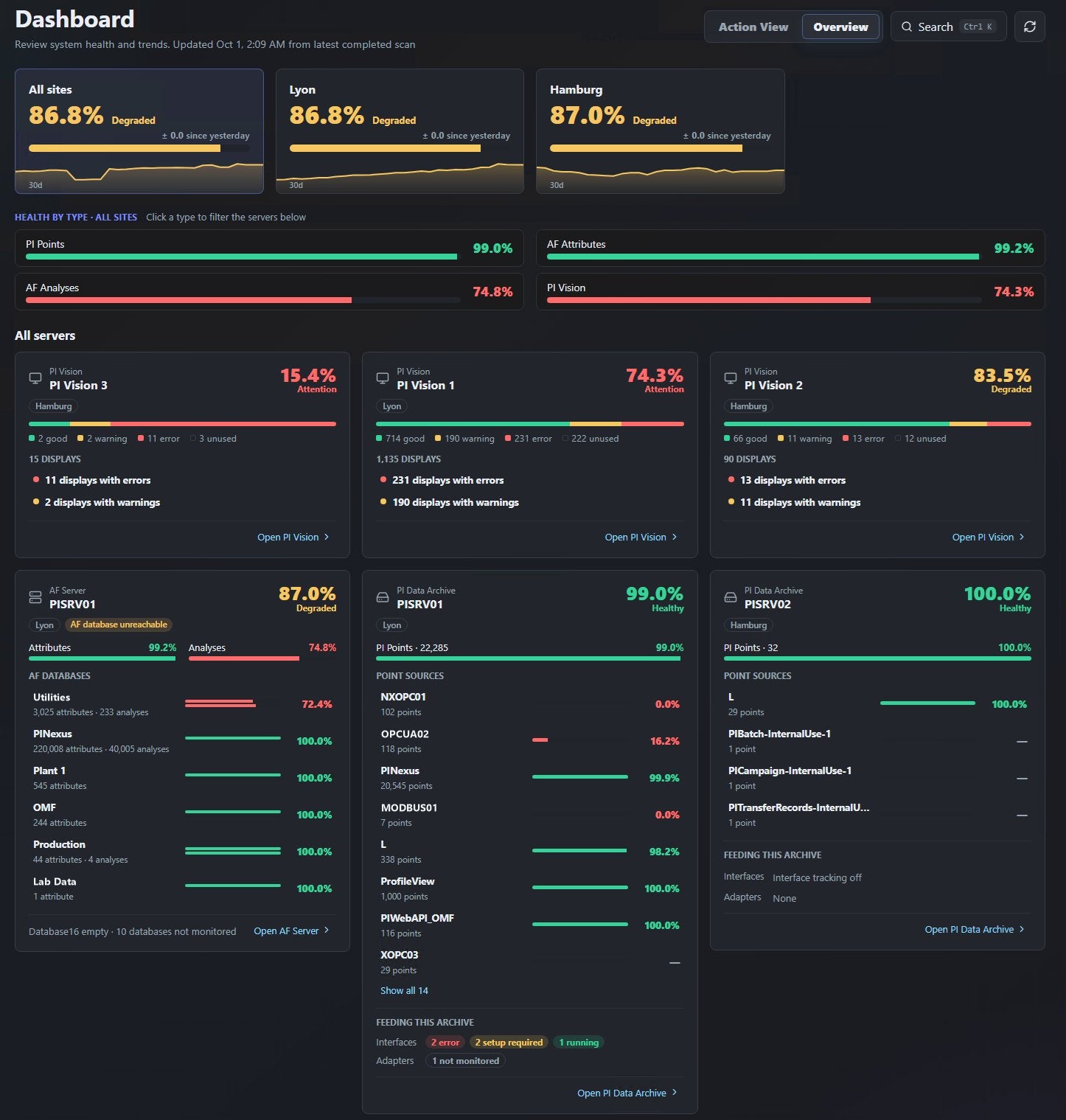
The sites dashboard shows the health of each location and drills down into every PI Data Archive, AF Server, AF Database and PI Vision instance, so you know where a problem sits before you open a single tool.
See which interfaces collect your PI data and whether they are operating normally. When an interface has a problem, understand which tags depend on it and where your investigation should start.

A tag that stops updating or reports a bad value can leave dashboards and calculations relying on unreliable data. PI Nexus+ checks data health automatically and can notify your team by email when problems are detected.

Monitoring coverage and notification timing depend on your connected systems and configured monitoring and email settings.
Correcting a source value is only part of the job when other calculations depend on it. PI Nexus+ finds the affected analyses and recalculates their results for the period that needs attention.
Supports eligible AF Expression analyses. Suggestions never start a recalculation on their own. Recalculation uses available source history; it does not restore missing source data.

Improve data fidelity without storing every fluctuation. The Automated Compression Analyzer scans historical raw data for each PI Point and calculates a recommended compression setting based on the data fidelity you need.
Review the raw snapshot, archived values, and recommended trend side by side before making a change. Apply recommendations one PI Point at a time, approve a selected group, or let PI Nexus+ update thousands of tags automatically.

PI Nexus+ connects inventory, health, issues, and dependencies so administrators can move from a warning to the affected PI Points, AF objects, analyses, and PI Vision displays without manual cross-checking.

Build a searchable PI Point inventory across Data Archives, evaluate latest value quality, and highlight stale, bad, missing, out-of-range, and rule-based issues.

Review AF Elements and Attributes with health context, linked PI Points, issue counts, derived template relationships, analyses, and dependency information in one place.

Surface problematic AF Analyses with rule details, service load, inputs, outputs, owning elements, and template relationships so calculation issues are easier to prioritize.

Inventory PI Vision displays, track ownership and access context, and identify dashboards that rely on stale, missing, or unhealthy PI Points and AF Attributes.

Follow relationships between PI Points, AF Attributes, AF Analyses, AF Elements, templates, and PI Vision displays to understand what depends on what.
What PI Nexus+ checks, how alerts and recalculation work, and how the annual subscription is priced.
PI Nexus+ checks PI Points, AF Attributes, Elements, Templates and Analyses, PI Vision displays, PI interfaces and the servers they run on. It finds stale, bad, missing, frozen and out-of-range data, broken references, unhealthy analyses and displays with missing data sources, and shows what depends on each problem.
Yes. PI Nexus+ sends email notifications for scan results, for PI interfaces that degrade, escalate or recover, and for new recalculation suggestions. Coverage and timing depend on your monitoring and email settings.
Only when you ask it to. You can submit a recalculation, or save a scheduled plan that runs hourly, daily or weekly. Suggestions after bad or stale data periods are shown for review and never start a recalculation on their own.
PI Nexus+ uses annual, size-based subscription tiers. Your PI System’s PI Point count determines which tier applies. The number of PI Data Archives you scan does not affect pricing.
The subscription includes PI Nexus+ usage, product updates and customer support for the subscription term. Multi-year subscriptions are available and may include discounted renewal years.
Yes. You can request a trial to evaluate PI Nexus+ in your own AVEVA PI System environment.
Explore PI System health, monitoring, and dependency insights in your own environment.

Learn how PI administrators can review health across PI Points, Asset Framework, AF Analyses, and PI Vision, including stale data, broken references, dependency impact, and change tracking.
Your cart is currently empty.
Start Shopping

