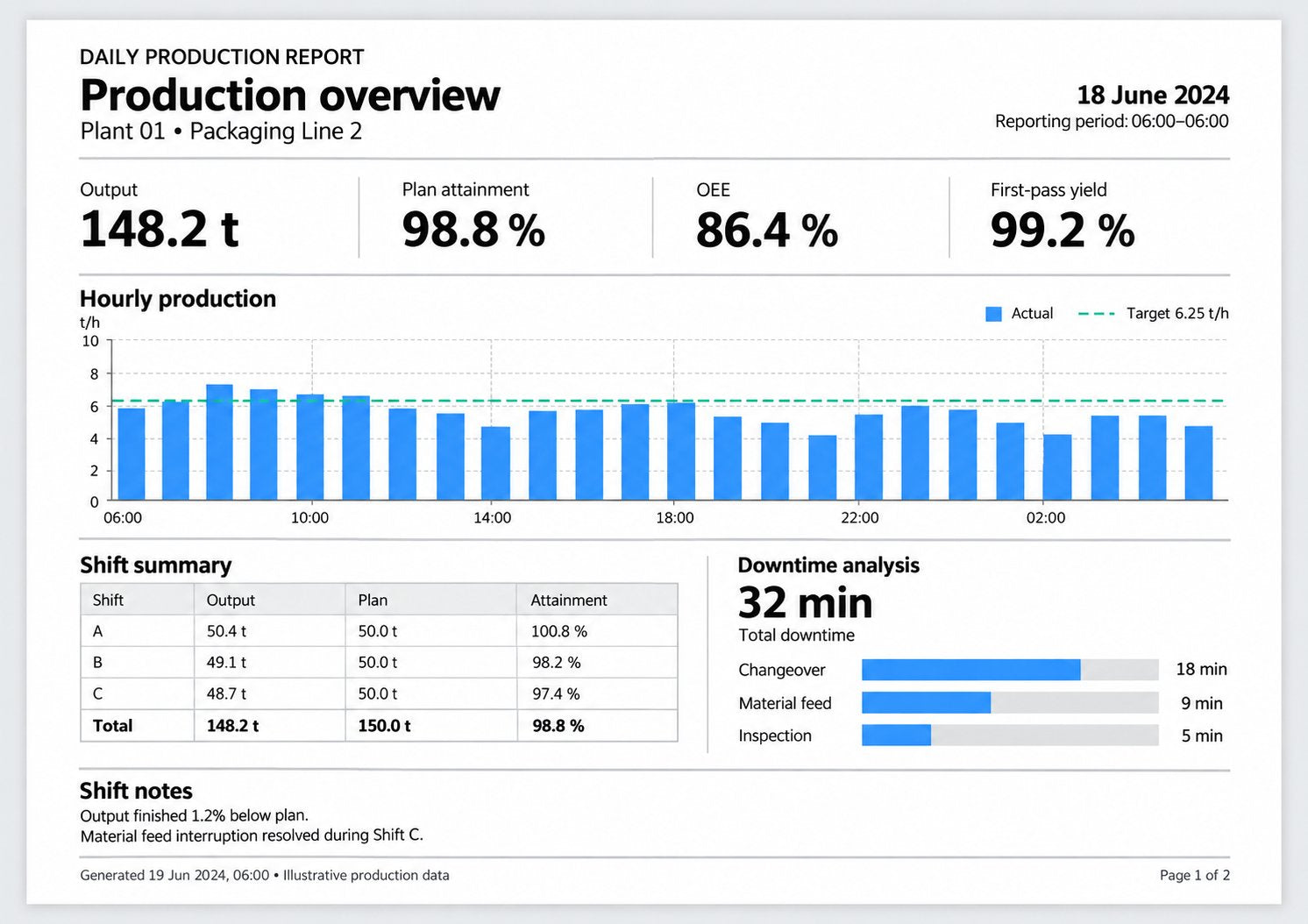
Build reports from the PI Vision displays you already have
No need to rebuild anything in a separate reporting tool. Pick your displays and Vision Report+ turns them into report pages: one display, every asset in a fleet, or the table data itself.
Single displayCollectionTable export
Single display
Use any PI Vision display as a report page, looking the way your team knows it.
Set the asset and time range per page, or take them from an Event Frame.
Report on rolling periods, such as the last 24 hours or the last 7 days.
Mix portrait and landscape pages in one report.
Combine as many displays as you need into one PDF.
Page settings for a single display.
Collections
One template, every asset. Vision Report+ repeats a display for each matching asset or Event Frame, which is ideal for line, fleet and batch overviews.
Cover every motor, line or batch in a single report.
Sort and filter the list the way your team needs it.
Show results in a grid or one per page, with automatic page breaks.
Equipment collection: every motor in the plant, continued across pages.
Table export to Excel and CSV
When recipients need the numbers rather than a picture of them, export Vision Library+ tables straight to Excel or CSV.
Set it up once and the report arrives when it is needed: at the end of every shift, when a batch completes, or as soon as a downtime event starts.
Schedules and Event Frames
Recurring reports for daily routines, event-driven reports for the moments that matter.
Hourly, daily, weekly or monthly, for example every morning at 06:00.
When an Event Frame starts or ends, such as a batch or a downtime event.
Each report shows the right equipment and time window for its event.
Missed reports are caught up automatically.
Schedules and an Event Frame trigger on one report.
On demand, backfill and printing from a display
Need a report right now, or for last month? Run it with one click, fill in past periods, or print the display you are looking at.
Run any report on demand from PI Vision.
Backfill reports for past days, weeks or months.
Print the current display to PDF or image, and email it straight away.
Give operators a print button on their display.
The print button symbol on a display.
Print Display panel in PI Vision.
Deliver PDF, Excel and image reports automatically
Reports go straight to the people who need them, with no exporting, attaching or forwarding.
Reports that look like your displays
Vision Report+ renders each display on the server instead of taking screenshots. Reports run unattended and keep the charts, tables and layout your team sees in PI Vision.
PDF, image, Excel or CSV.
Split one report into several PDFs, sent in a single email.
Automatic file names with the report or event time.
A weekly production report, rendered on the server.
Delivery and storage
Every finished report lands where your team already works.
Email, with the PDF attached or the report in the message.
Microsoft Teams channels.
Printers on the shop floor or in the control room.
Shared network folders.
A report archive you can open from PI Vision, even years later.
File naming and email recipients.
Approvals, history and control over every report
Know which reports ran, who approved them and what changed. That matters on regulated sites, and for anyone who has to stand behind a number.
Approval workflow
Add a review step before a report goes out as the official record.
Reports start as watermarked drafts.
Approvers get an email and approve or decline in PI Vision.
The approved report records who approved it and when.
Comments keep review notes with the report.
A report waiting for approval, with its history and comments.
Execution history
See every report run at a glance.
Live status: queued, processing, completed.
See what triggered each run and which equipment it covered.
Open, download or rerun any past report.
Details of a report triggered by a downtime event.
Version history and permissions
Every change to a report is tracked, and access follows your PI security.
Version history with the reason for each change.
Restore an earlier version with a single click.
Decide who can view, run or edit each report.
Version history of a report definition.
Reports teams automate first
Four everyday reports, and how Vision Report+ produces each one.
Scheduled
Shift handover
Runs
Daily, at the end of each shift
Contains
KPIs, downtime, trends and operator notes
Goes to
Email to the next shift
Event Frame
Batch report
Runs
When a batch ends
Contains
KPIs and trends for the exact batch period
Goes to
Approval, then archive and folder
Event Frame
Downtime report
Runs
When a downtime event starts or ends
Contains
What happened, with the event list as an Excel file
No. Vision Report+ renders each display on your server, so reports run unattended, without anyone having the display open, and keep the layout your team sees in PI Vision.
Which tables can be exported to Excel or CSV?
Vision Report+ exports these Vision Library+ tables: Time Series Table+, Events Table+, Asset Comparison Table+, AF Table+, Manual Data Entry+ and Manual Input Table+.
Can reports be reviewed before they are distributed?
Yes. With the optional approval workflow, reports start as watermarked drafts and your approvers are notified by email. Once approved, the watermark is removed and the report records who approved it and when.
Can I regenerate reports for a past period?
Yes. Rerun any past report, or backfill reports for a whole period such as last month. Reports missed while the system was offline are caught up automatically.
What do we need to run it?
PI Vision 2021 or later, PI Web API 2020 or later and PI AF Server 2018 SP2 or later, plus a Windows server for the Vision Report+ service. It runs on-premise and uses your existing PI security. We go through the details with you before the trial.
Is a trial available, and how does licensing work?
You can request a trial in your own PI Vision environment. We confirm compatibility and the details needed for your trial license, then email the evaluation instructions. Commercial licensing is quoted for your deployment and reporting requirements.
Request a Vision Report+ trial
Pick a shift, batch or daily report and test it with your own PI Vision displays. We’ll confirm compatibility and your trial license details, then email the evaluation instructions.