Changes without context
A display may look different, but the reason, author, timestamp, and exact objects changed can be difficult to reconstruct later.
Vision Audit+ for AVEVA PI Vision
Track display changes, capture the reason behind them, restore previous versions, recover deleted displays, and support validation workflows—without moving users out of PI Vision.
The governance gap
PI Vision makes dashboards easy to build and adapt. For operationally critical or validation-sensitive displays, that flexibility creates a harder question: how do you understand a change, recover from it, and keep trusted content under control?
A display may look different, but the reason, author, timestamp, and exact objects changed can be difficult to reconstruct later.
Unwanted edits and deleted displays can force teams to rebuild layouts manually or search for an uncertain backup.
Without a clear Draft, In Review, and Validated lifecycle, it is harder to distinguish work in progress from approved operational content.
The Vision Audit+ approach
Keep display history, change reasons, version comparison, rollback, deleted-display recovery, validation states, and notifications in one PI Vision-centered workflow.
The outcome
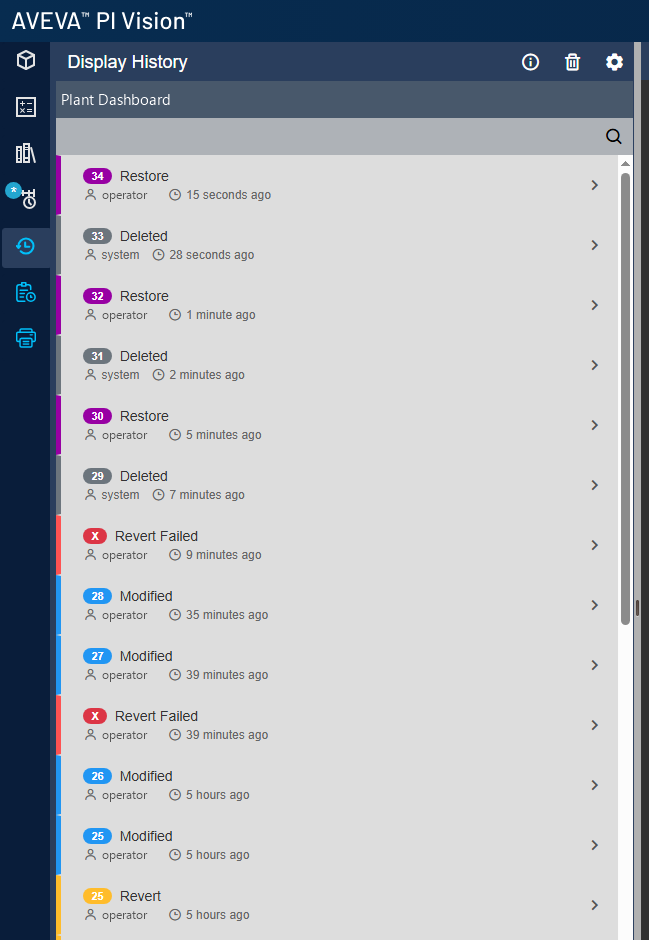
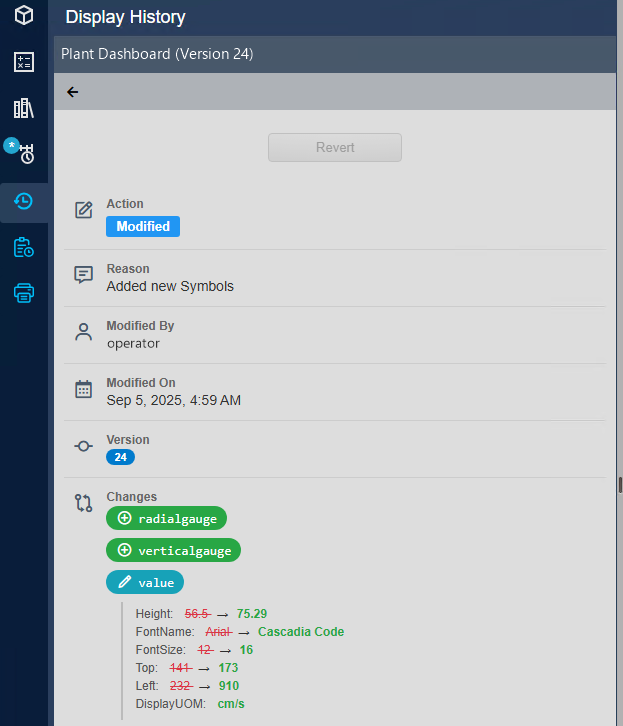
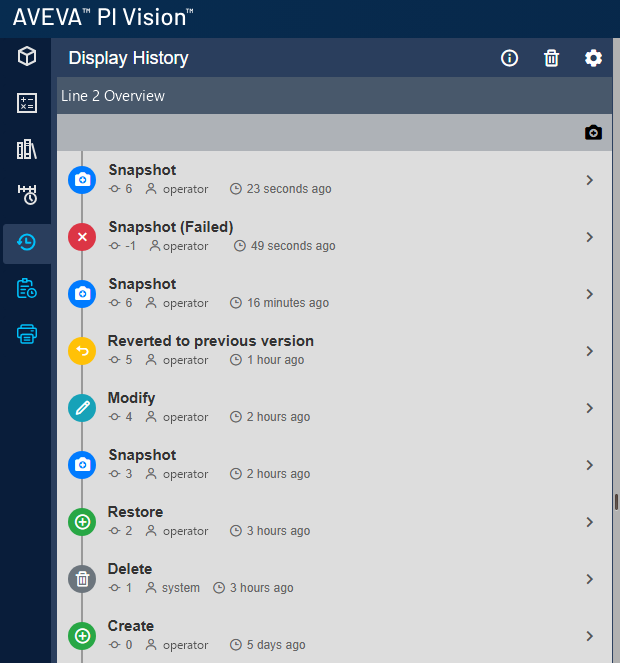
See the author, time, event, comments, and affected display objects in a reviewable history.
Revert to a previous version or restore a deleted display when something goes wrong.
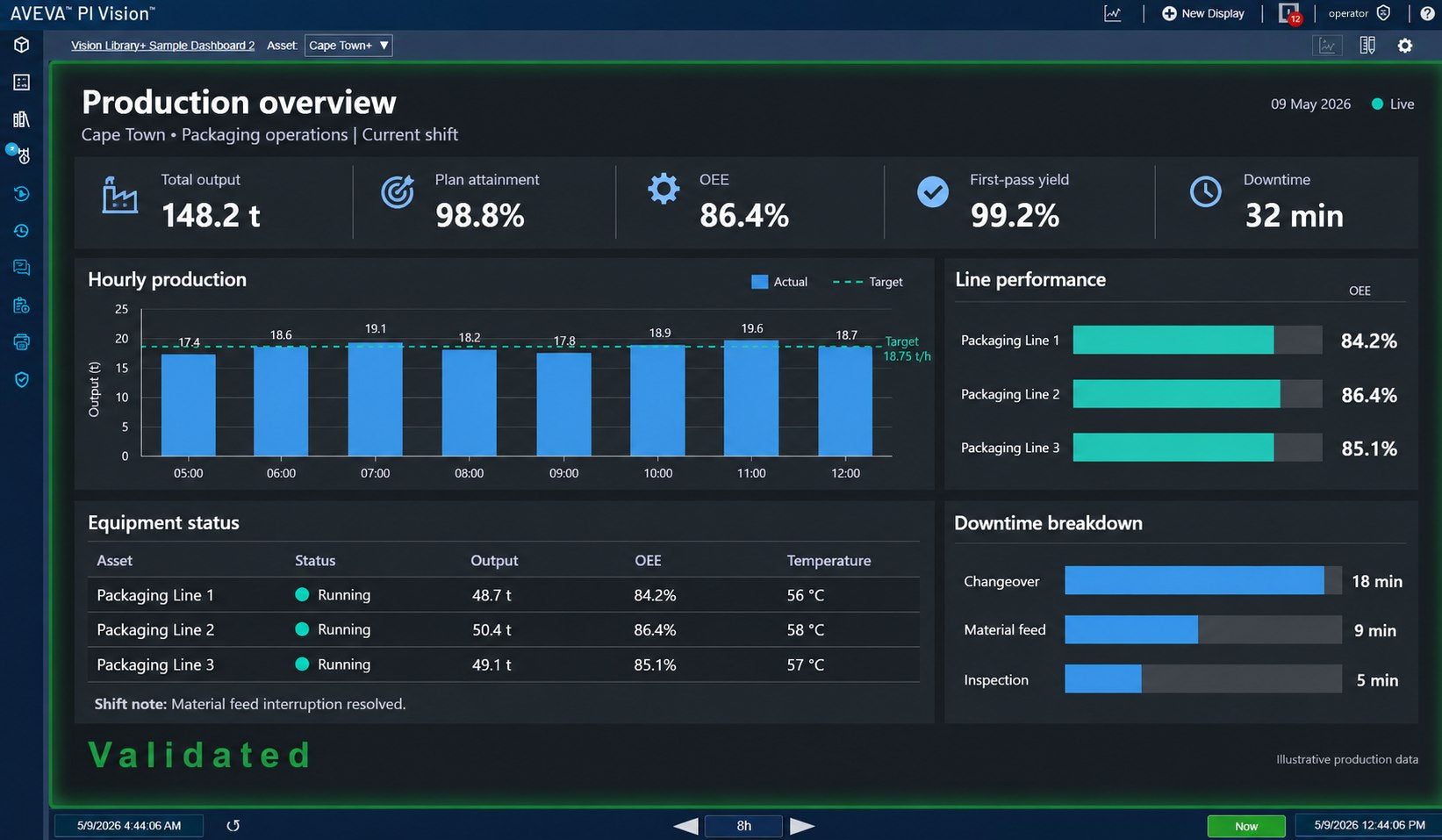
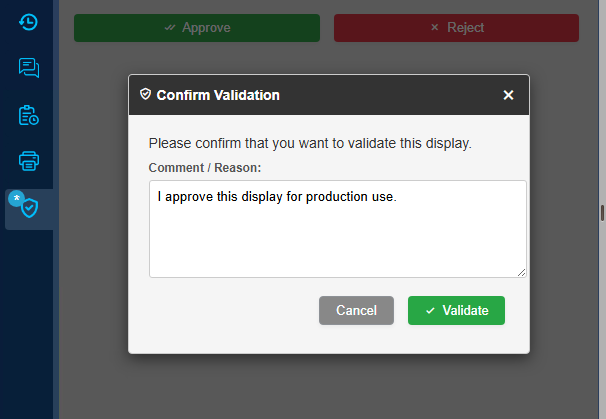
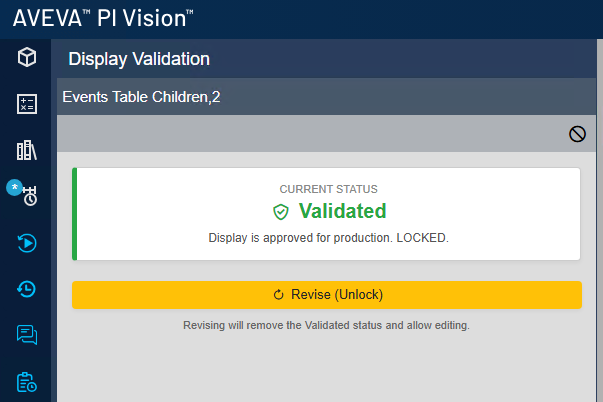
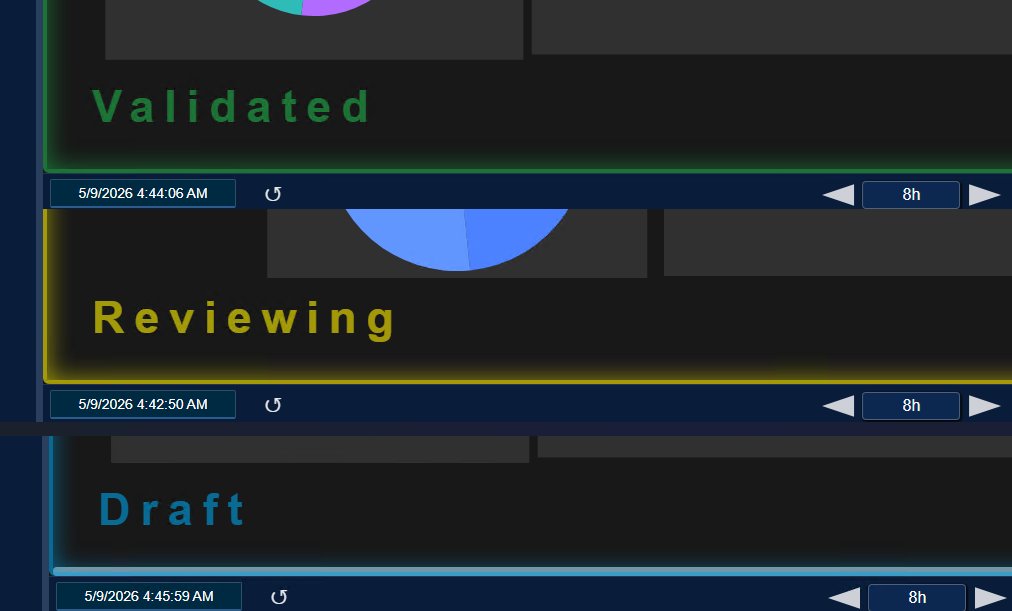
Move displays through Draft, In Review, and Validated states and apply stronger control to governed displays.
Core capabilities
Vision Audit+ adds the controls PI System teams need around change review, recovery, validation, and communication while keeping the experience connected to AVEVA PI Vision.
Traceability
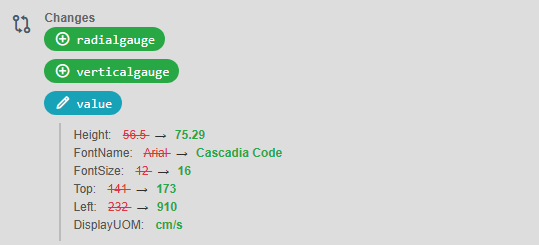
Capture create, modify, snapshot, delete, restore, and revert events with user and timestamp context. Review individual event details and see which display objects changed.
Recovery
Return a display to a known earlier version instead of reconstructing it manually. Restore deleted displays together with their associated thumbnail and identities.
Validation workflow
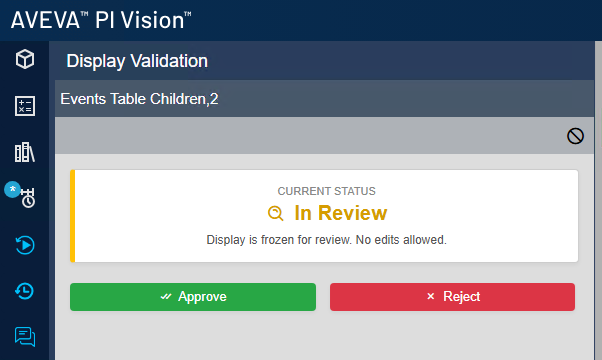
Move governed displays through a visible lifecycle and identify their current state at a glance. Hardened locking helps protect displays that should not be changed casually.
Accountability
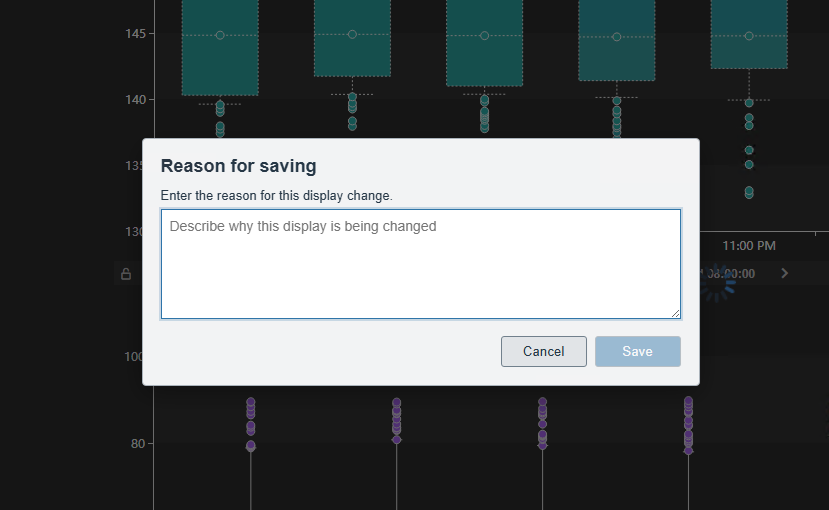
Administrators can require a reason before a display is saved. Comments can add operational or quality context to supported events so the history explains why a change occurred.
Awareness
Notify configured recipients when important display activity occurs. Give administrators and stakeholders earlier visibility into modifications and deletions.
Oversight
See how many displays are Draft, In Review, or Validated and use Change History telemetry to monitor product performance in the environment.
How it works
Vision Audit+ records display activity automatically and gives authorized teams practical tools to investigate, recover, and validate the dashboards their operation depends on.
01 / Record
Every supported display event becomes part of a timeline with its user, timestamp, event type, and related details. Teams gain a consistent place to investigate how a display reached its current state.
02 / Explain
When the option is enabled, Vision Audit+ asks the user for a reason before completing the save. The explanation remains with the history so reviewers are not left to infer intent from a visual difference.
03 / Recover
Review earlier states, return a display to a selected version, or recover a deleted display. The recovery workflow helps teams respond quickly to mistakes, unwanted edits, and accidental deletion.
04 / Validate
Use Draft, In Review, and Validated states to communicate where a governed display stands. Visible state cues and hardened locking help teams protect content that has completed review.
Built for the PI Vision environment
Vision Audit+ extends the PI Vision experience rather than introducing a separate external governance portal. Users review history, recover displays, and work with validation states in the same environment where the displays are used.
History, recovery, validation cues, and notifications stay connected to the PI Vision workflow.
Deploy alongside PI Vision and PI Web API in the environment your PI System team already operates.
Current releases support concurrent Vision Audit+ instances for failover-oriented deployment designs.
Use a trial to test display history, rollback, recovery, validation, and notification behavior with your own displays.
Vision Audit+ FAQ
Practical answers about change history, rollback, validation workflows, deployment, and trials.
Vision Audit+ records supported display events such as creation, modification, snapshots, deletion, restoration, and rollback. The history includes the responsible user, timestamp, event type, and event details. For changes, teams can inspect which display objects were affected and retain comments or save reasons for additional context.
Yes. The display history can show affected symbols and detailed changes for supported display objects. This helps reviewers move beyond a simple “display modified” entry and understand which parts of the PI Vision display were added, removed, or changed.
Yes. Administrators can enable a setting that presents a dialog before a display save and requires the user to enter a reason. The reason is retained with the display history, giving teams a clearer record of why the change was made.
Yes. Authorized users can select an earlier version from the history and revert the display to that state. This provides a practical recovery path after an unwanted edit or configuration problem and avoids manually reconstructing the previous layout.
Yes. Vision Audit+ can restore deleted displays from the recovery workflow. Current releases also restore associated thumbnail and identity information, helping the recovered display retain more of its original context.
Governed displays can move through Draft, In Review, and Validated states. The current state is visible in the PI Vision experience, and locking behavior helps protect content that has completed review. Enabling or disabling the validation workflow is logged; when validation is disabled, the display returns to Draft.
No software feature alone makes an environment compliant. Vision Audit+ provides technical controls—such as display history, change reasons, validation states, locking, recovery, and notifications—that can support your organization’s governance, validation, and quality procedures. Your organization remains responsible for its processes, configuration, validation, and regulatory assessment.
Yes. Vision Audit+ can send configured email notifications for important display activity, including modifications and deletions. Notifications give administrators and stakeholders earlier visibility while the detailed history remains available for investigation.
Vision Audit+ is deployed in the customer environment alongside AVEVA PI Vision and PI Web API. Its user-facing tools extend the familiar PI Vision experience. Current releases also support concurrent instances for failover-oriented deployment designs; the installation guide should be used when planning the final architecture.
Yes. You can request a trial to evaluate Vision Audit+ with your own PI Vision displays and operating procedures. A trial is the best way to test history capture, required save reasons, rollback, deleted-display recovery, validation states, notifications, and deployment fit in your environment.
Take the next step
Walk through your display-change, recovery, and validation requirements with Software Athlete—or request a trial and evaluate the workflow in your own PI System environment.
Your cart is currently empty.
Start Shopping