



PI Nexus+ v1.8:
PI System access security, fixes with undo and Microsoft 365 email
PI Nexus+ v1.8 adds a map of who can do what in your PI System. A new Access page reads the security of every PI Data Archive, AF Server and PI Vision instance, raises Access issues and simulates changes before anyone applies them. Administrators can now fix findings from PI Nexus+, with undo.
Product: PI Nexus+ for AVEVA PI System Release: v1.8 Date: October 27, 2026
This release update covers the changes since v1.7. Notification email now also works with Microsoft 365, and host monitoring watches commit charge and the PI Analysis Service. If you are upgrading, read What changes when you upgrade.
New: Access
The Access page, for administrators, shows who can read, write or administer what across PI Data Archives, AF Servers and PI Vision. PI Nexus+ reads the security every four hours and on request, without writing anything.
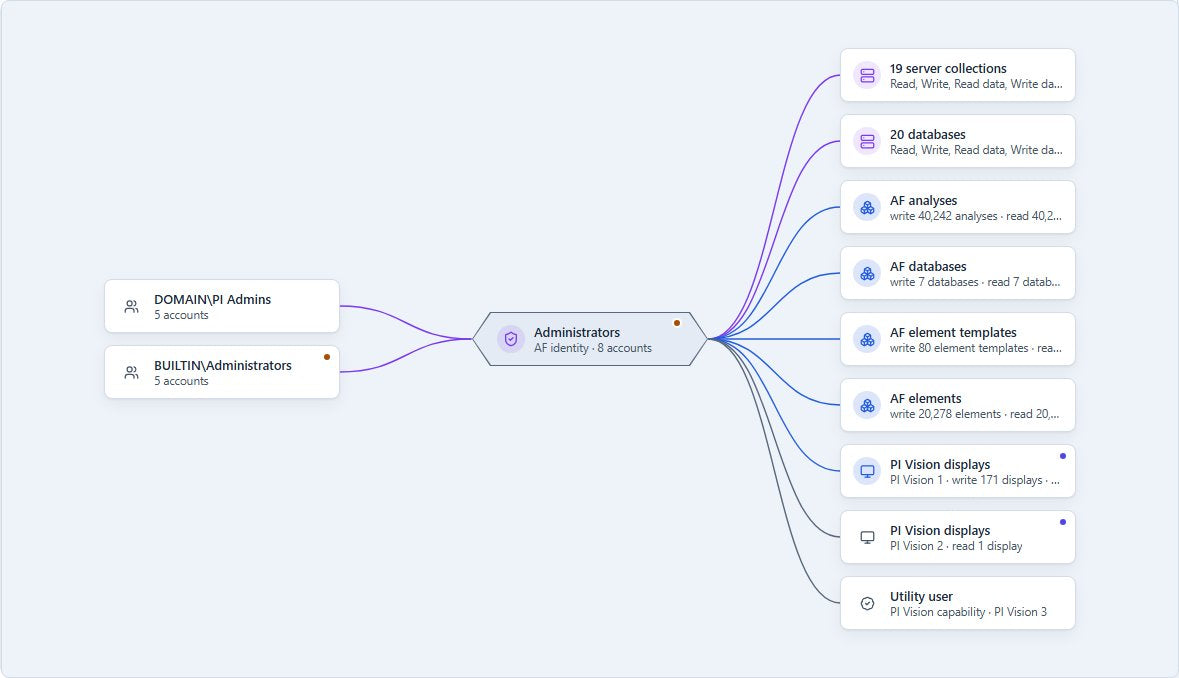
- Explore identities and accounts: see who is mapped to each identity, how many accounts it reaches through nested AD groups and the strongest right it grants, or look up any account to see what it can reach on each server.
- Access maps: server, account, identity and object maps coloured by right (Admin, Write, Read, Deny), with the path that explains why an account reaches a grant.
- Access on every object: an Access tab on PI Points, PI Vision displays, AF databases, element templates, elements and analyses.
- 22 kinds of Access issue: for example write or admin rights for Everyone or Domain Users, an admin identity mapped broadly, mappings to invalid accounts, piadmin enabled, or a display shared wider than its data. A new broad grant raises an Error, so drift is noticed.
- Security changes in Change History: identities, mappings, group membership and object security are recorded like other changes.
- Access reviews: mark an identity reviewed and see when it changes afterwards. The Review CSV is the evidence file for periodic access reviews.
New: simulation and fixes
PI Nexus+ no longer only finds problems. Administrators can test an access change before making it, and fix selected issues directly.
- What-if simulation: stage mapping, identity, group membership and security changes and see who loses and gains which rights, and which issues resolve or appear, before anything changes.
- Scripts with undo: export a saved scenario as a PowerShell script with a matching undo script.
- Fix from the issue: PI Point attribute issues, and Access issues with an unambiguous change, can be fixed from the issue itself. PI Nexus+ writes only while the object still holds what it read, and never removes its own access.
- Undo: every fix can be undone while the object still holds what the fix wrote. If it has changed since, PI Nexus+ shows the conflict and lets you decide.
- A record of every write: fixes, undos, Compression Tuning applies and analysis recalculations appear under Change History.
- Off by default: each kind of write must be allowed per server by an administrator, with a production licence.
New features
Email with Microsoft 365
- OAuth 2.0 sign-in to SMTP: notification email works with Exchange Online tenants that disable basic authentication.
- Microsoft Graph: a second way to send, over HTTPS only, for networks that block SMTP.
Host monitoring
- High commit charge: a new alert on every host. Unlike memory used, it stays meaningful on PI Data Archive and SQL Server hosts, which fill memory with cache on purpose.
- PI Analysis Service: evaluations, skipped evaluations, lag and the recalculation queue, without PI Perfmon tags. New alerts name the analyses most affected.
Lists and administration
- Multi-select filters: PI Points, PI Interfaces, Issues, the AF pages and Change History accept several values per filter, for example every health state except Good. CSV exports follow the filters.
- Remove: PI Data Archives, AF Servers, AF databases, PI Point rules, attribute checks and PI Adapter sources can be removed together with their inventory.
- PI Vision farms: a load-balanced PI Vision farm is now one instance, with its other web servers listed for host monitoring.
Fixes
- PI Point rules save immediately instead of after about half a minute on large estates.
- Host limits for PI Buffer queues and SQL Server backups, logs and blocking are saved.
- AF CSV exports: AF Attributes and AF Analyses exports contain exactly the rows the page shows.
- PI Vision counts: a PI Vision database configured under two instances is no longer scanned and counted twice.
- AF Server connections stay connected when the server's entry in the AF known-servers list is renamed or merged.
- Safer CSV exports: a name can no longer carry a spreadsheet formula into an export.
- Security updates: updated components address published security advisories, including the .NET runtime the installer sets up.
What changes when you upgrade
The database upgrade cannot be rolled back. Take a SQL backup and upgrade in a maintenance window with no scans running. The Installation Guide describes the upgrade.
- Expect Access issues after the first read: the read-only access read starts on its own. Access issues appear without email; the Access email is off until you enable it. Access is visible to administrators only.
- Check hosts with high commit charge: the new alert is on by default. A host already above 90 % raises a Warning 30 minutes after the upgrade, and is emailed if host monitoring email is on.
- Send a test email: existing settings keep working, but mail is sent with a new library. "Use SSL" means TLS on connect for port 465 and STARTTLS on other ports.
- Use Disable, not Remove, to keep data: Remove now deletes the item together with its inventory.
- Merge duplicate PI Vision instances: a second instance for the same database is refused, and existing pairs show a warning until they are merged.
- Find moved settings: PI Data Archive and AF Server settings, including Interface Tracking and Runtime Monitoring, are now on tabs under the selected server.
For administrators
- All writes start off: fixes stay off until you allow them per server. Compression Tuning applies of the last year appear in the writes record with Undo.
- New rights, only for the features you use: the access read needs read access to PI, AF and PI Vision security and to the directory; fixes need write rights on what they change, and PI Nexus+ never grants itself a right. Microsoft 365 email needs an Entra ID app registration with the send permission.
- Runtime and split installations: the installer updates .NET 10 to 10.0.14, and the web application and the Scanner service must run the same build.
Documentation
The Installation, Administration and User Guides describe the upgrade, the access read rights, writes and email setup.
Read the documentation online
Find user and administration documentation for PI Nexus+.


