



Vision Report+ v2.0:
Page frames, SharePoint delivery and report alerts
Vision Report+ 2.0 adds page frames, so you lay out PDF pages directly on a PI Vision display. You can preview a report before saving it, deliver its files to SharePoint and get alerts when a run fails or a schedule produces no run. Mail can now use OAuth 2.0 or Microsoft Graph.
Product: Vision Report+ for AVEVA PI Vision Release: 2.0.0 Date: October 25, 2026
The PI Vision toolbar has a new design, high-availability installations are more robust, and a new scheduled report no longer creates runs for the past. The upgrade migrates the AF database one way, so plan it for all service nodes together. If you are upgrading, read What changes when you upgrade first.
New symbol
Page Frame
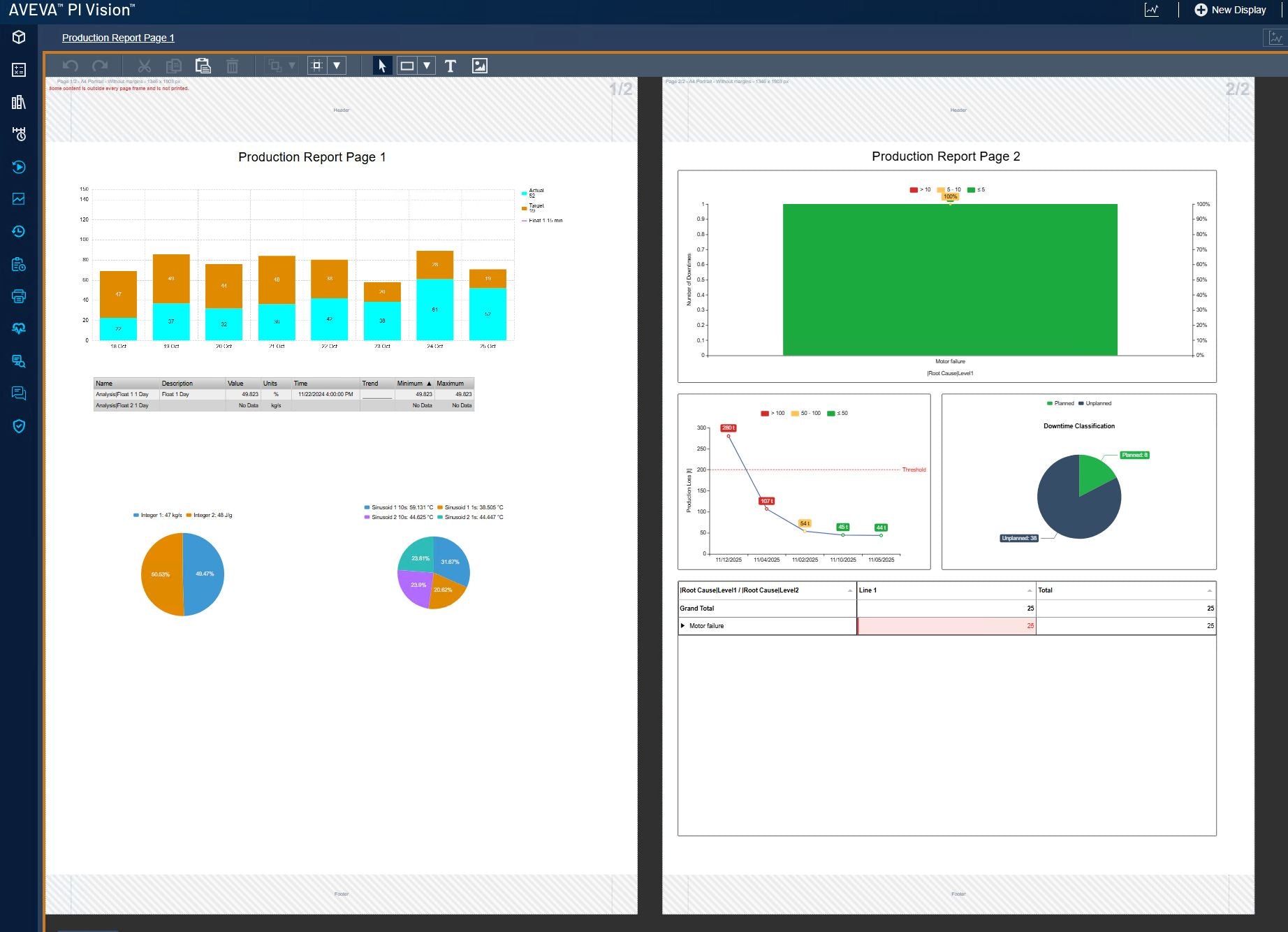
The Vision Report Page Frame symbol marks the area of one PDF page on a display. A display can hold several frames, and each one prints as its own page.
- Its own page settings: each frame has its own paper format, orientation, margins and header and footer.
- One scale for every page: a symbol prints at the same size in every format, so turning a frame to landscape turns the page.
- Print order and page titles: pages follow the frames row by row, and a frame title becomes the page subtitle in the PDF.
- Layout help in edit mode: page numbers, guides, Add page to the right or below and warnings for symbols that cross a frame edge.
- Images and collections: image output gives one image per frame, and collections print the frame pages of every item.
Learn more about page frames →
New features
Preview and layout
- Preview a report or a single page from the report editor before saving it; nothing is delivered.
- Print a display edge to edge without PDF margins, optionally with header and footer on top.
SharePoint delivery
- Upload report files to a SharePoint document library, per report and into a folder of your choice.
- Mail can attach the files, link to them or both, and Teams messages can link the uploaded files.
Alerts
- Alerts by mail and Teams when a report run fails or a schedule produces no run, with a notice when the report recovers.
- Empty-page check before delivery, with an option to hold delivery when a page is empty.
Mail and Teams
- SMTP with OAuth 2.0 through a Microsoft Entra ID app, or Microsoft Graph instead of SMTP, with clear hints for common Microsoft 365 errors.
- Teams cards show buttons for PI Vision, the displays and SharePoint files.
- Remote PI Vision URL for links in mails and Teams, for example through an application proxy.
A redesigned toolbar
- One clean style in PI Vision's colors for the Reports and Print panes, the editors, dialogs and symbol settings.
- Reports list with search always visible, quick filters and grouping by category, trigger, output type or owner.
- Executions grouped by day with clear status labels, plus Share link and Copy link to point colleagues to a report or execution.
Reports and executions
- Backfill without delivery by default, and Re-run creates a new execution and keeps the original.
- Failure evidence: a failed display render keeps a screenshot and the step it stopped at.
- Copy and delete a report from the executions view; deleting a report or an execution asks for confirmation.
Operations
- System Status lists every service node with its role, state and last error.
- Support bundle with secrets removed, created from System Status.
- High availability: a node confirms its leadership before leading, and a takeover continues where the previous leader stopped.
Fixes
- A new scheduled report no longer creates past runs for the time since the service started (about 15 for an hourly report).
- One event-frame trigger no longer blocks a report's other triggers.
- Charts no longer show a hover cursor or tooltip in printed output.
- Cancelled runs are never delivered, and no blank fallback PDF is sent.
- Hung runs stop at a deadline and are reported instead of blocking the service.
- Saving over a newer version of a report is refused instead of overwriting it.
- Mail subjects no longer break across lines, and report and display names are encoded in the mail text.
- Opening the Print pane no longer logs a "Communication Error" in PI Vision.
- Many smaller fixes across the toolbar and its translations.
What changes when you upgrade
Existing reports may behave differently in these points:
- Times in placeholders and file names (event start and end, execution and trigger times) use the report time zone, or the service time zone when none is set.
- Print delays are removed: Vision Report+ waits until a display has loaded its data before printing it, so the Page Print Delay and page Print Delay settings are gone.
- A display that does not load fails the page instead of printing an error page.
- Backfill runs do not deliver unless you turn delivery on.
- Teams cards show buttons instead of text links.
- Report pages that are file, data or script URLs are refused.
Documentation
The Vision Report+ documentation is now online, updated for 2.0:
- User Guide for creating reports, page frames, executions and approvals.
- Installation Guide for installing, licensing and updating to 2.0.
- Administration Guide for delivery settings, permissions, operation and troubleshooting.
- Reference for placeholders, page sizes, output types and execution statuses.
Read the documentation online
All Vision Report+ guides and the reference in one place.


