



Vision Audit+ v2.0:
display health checks and where-used search
Vision Audit+ v2.0 adds two new panes to AVEVA PI Vision. Data Sources shows which data behind a display is failing or stale, and Display Usage finds every display that uses a PI point or AF attribute. Retention now also keeps the approval trail of validated displays.
Product: Vision Audit+ for AVEVA PI Vision Release: v2.0 Date: November 18, 2026
Running AVEVA PI Vision 2026?
Install Vision Audit+ 2.0.1 or later: it is the minimum version for PI Vision 2026. See what to check after the upgrade →
Vision Audit+ has so far tracked what changes on a display. Version 2.0 also looks at the data a display shows: whether its sources deliver good, current values, and where else they are used. This release covers the changes since v1.4. If you are upgrading, read What changes when you upgrade.
Data Sources starts switched off
After installing or upgrading, an administrator turns on Data Sources in the Configuration Utility before the Data Sources and Display Usage panes appear in PI Vision.
New panes
Data Sources
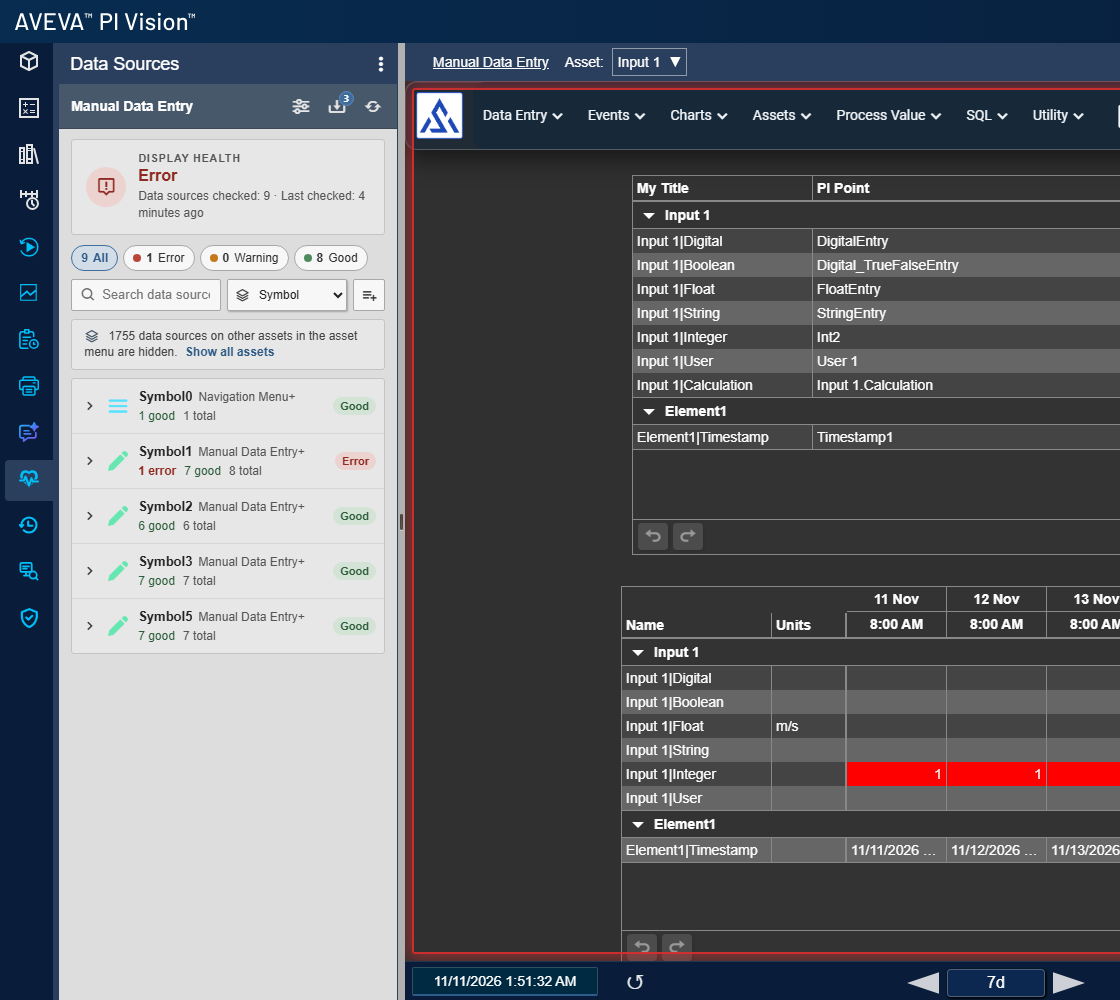
Data Sources lists every data source of the open display, from PI points to asset-relative AF attributes, with its health. You see at a glance which values are bad, missing or stale, and which symbols show them.
- Clear status per source: Error for bad quality, a missing source or one that cannot be read; Warning for stale data or no current value.
- Find the affected symbols: filter, search and group by asset, attribute, symbol or symbol type, and hover a source to highlight its symbols on the display.
- Visible on the display: a display with errors or warnings gets a colored border and a notification. Symbol highlighting is optional.
- Follows the selected asset: when you switch assets in PI Vision's asset menu, the health covers the asset you are looking at.
- Background checks: monitor selected displays or all displays, check on demand, and set per display what is checked for each symbol or source.
Display Usage
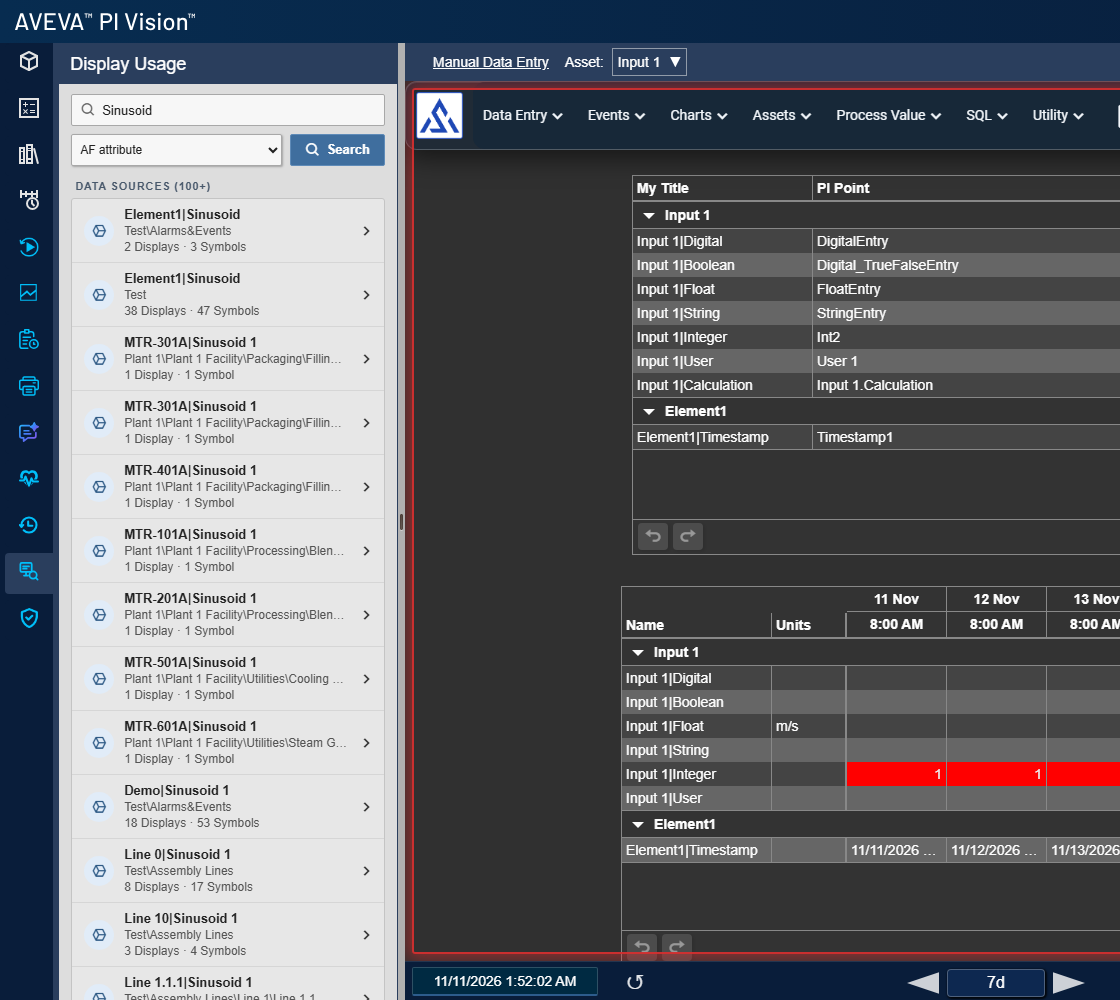
Display Usage answers "which displays use this tag?" before you rename, replace or retire a PI point or AF attribute.
- Search PI points and AF attributes: each match shows how many displays and symbols use it.
- Where-used list: see the displays that use a source, filtered by direct, asset-relative or asset-collection use and by symbol type.
- Jump to the symbol: opening a display from the results highlights the symbols that use the source.
- Respects PI Vision access: results include only displays the user can see.
- Stays current: added or removed AF assets are picked up without editing the display.
New features
Data export
- Export to Excel or CSV: collect up to 25 data sources from Data Sources or Display Usage and export their values for the display's time range, a relative range or fixed start and end times.
Administration
- Independent feature switches: turn Display History, Validation, Data Sources and Data Export on or off separately. A disabled feature does no work on the server.
- One settings view for every pane: settings and System Status now open from each Vision Audit+ pane.
- Safer toolbar updates: if a toolbar update from the Configuration Utility fails, the previous toolbar and configuration are restored.
Security
- Updated .NET runtime: Vision Audit+ now ships .NET 10.0.15, which fixes a .NET denial-of-service vulnerability in the runtime shipped with 1.4.
Fixes
- Validation history is kept: retention no longer deletes submitted, validated, rejected and other validation entries, so the approval trail of a validated display stays complete.
- Retention By Count works: it now deletes versions beyond your limit. Before, it deleted nothing.
- Apply keeps your settings: running Apply in the Configuration Utility no longer resets the save-reason requirement and the daily snapshot time.
- X cancels: closing the Create Snapshot or Revert confirmation with X no longer carries out the action.
- Owner checks: owner-only Revert and Validate accept the owner when the user name differs only in upper and lower case.
- Change details: history details now list the data sources of a change when a symbol uses the same source twice.
- Notifications close: the X button on Display History and Display Validation notifications now closes them.
- Many smaller fixes across settings, sliders, the installer and service logging.
What changes when you upgrade
System requirements are unchanged from v1.4, and your existing license file keeps working. The upgrade extends the Vision Audit+ AF database and cannot be rolled back, so back up that database before you upgrade.
- Turn on Data Sources to use the new panes. It is off after the upgrade; once it is on, no display is monitored until you enroll it or choose to monitor all displays.
- Expect retention By Count to delete. If you use it, versions beyond your limit are removed at the first nightly cleanup after the upgrade. Validation entries are kept.
- Check your save-reason and snapshot settings if you ran Apply in the Configuration Utility on v1.4. The upgrade itself does not change them.
- Confirm Revert and Create Snapshot with Yes. Closing the confirmation with X now cancels.
- Open settings from any pane. Settings and System Status are no longer inside Display History.
For administrators
- Grant read access for health checks: with Data Sources on, the service account needs Read and Read Data on the PI points and AF elements of monitored displays. Sources it cannot read show as Error.
- Going back to v1.4 is not supported: v2.0 has to be uninstalled before an older version can be installed.
- New guide file names: the PDFs are now separate Installation, Administration and User Guides.
Documentation
The Installation, Administration and User Guides were rewritten for v2.0 and cover Data Sources, Display Usage and data export.
Read the documentation online
Installation, configuration and everyday use of Vision Audit+ v2.0.


