



PI System access review
Who Can Write to Your PI System? Map Access from AD Group to PI Point
"Who can change this tag?" sounds like a one-minute question. In a PI System that has grown for years, it means tracing nested AD groups, mappings, identities and object security across PI Data Archive, AF and PI Vision. PI Nexus+ 1.8 shows the answer on one map.
The access question that is hard to answer
Three situations most PI System administrators know:
- The audit. Security asks for everyone with Write access to the production PI Data Archive and the AF databases behind the batch reports, signed off by Friday.
- The incident. A setpoint tag was overwritten. Before anyone asks who did it, someone asks who could have done it.
- The leaver. A contractor's account is disabled. Does a mapping still point to a group they were in, and which PI Vision displays did they own?
All three are the same question: which accounts can read, write or administer which PI Points, AF objects and PI Vision displays, and why.
Why PI System access is spread across four layers
In a PI System, rights are rarely granted to a person directly. They travel through a chain, and every link is configured in a different place:
-
AD account
DOMAIN\j.engineer - Nested AD groupsOT Engineers, inside PI Writers
- PI mappingPI Writers is mapped to an identity
- PI or AF identityPIEngineers
- Object securityWrite on a PI Point, AF element or display
Illustrative example. Answering the question by hand means visiting each layer with its own tool:
- Active Directory Users and Computers or PowerShell to expand nested groups, one level at a time.
- PI System Management Tools (PI SMT) for mappings, identities and point security on each PI Data Archive.
- PI System Explorer for AF identities, mappings and the security of databases, element templates, elements and analyses.
- PI Vision for folder and display permissions, where a display inherits from its folder.
The result is usually a spreadsheet that is right on the day it is finished. The next group membership or mapping change makes it wrong, and nobody notices.
What a manual access review usually misses
The risky grants are rarely the ones you are looking for. They are the broad ones that crept in over the years:
- Write or Admin rights for Everyone or Domain Users.
- An admin identity mapped to a broad group.
- Mappings to accounts that no longer exist in the directory.
- The piadmin identity still enabled.
- PI Vision publishing rights for a wide audience.
- A display shared wider than the data it shows.
- Displays whose owner has left and is disabled or deleted in the directory.
- A review that was done once and is now overdue.
These are examples of the 22 kinds of Access issue that PI Nexus+ checks for.
See the whole access chain on one map
PI Nexus+ 1.8 adds an Access page for administrators. Every four hours, and whenever you select Read now, it reads the security of every PI Data Archive, AF Server and PI Vision instance it monitors. It only reads; nothing is changed.
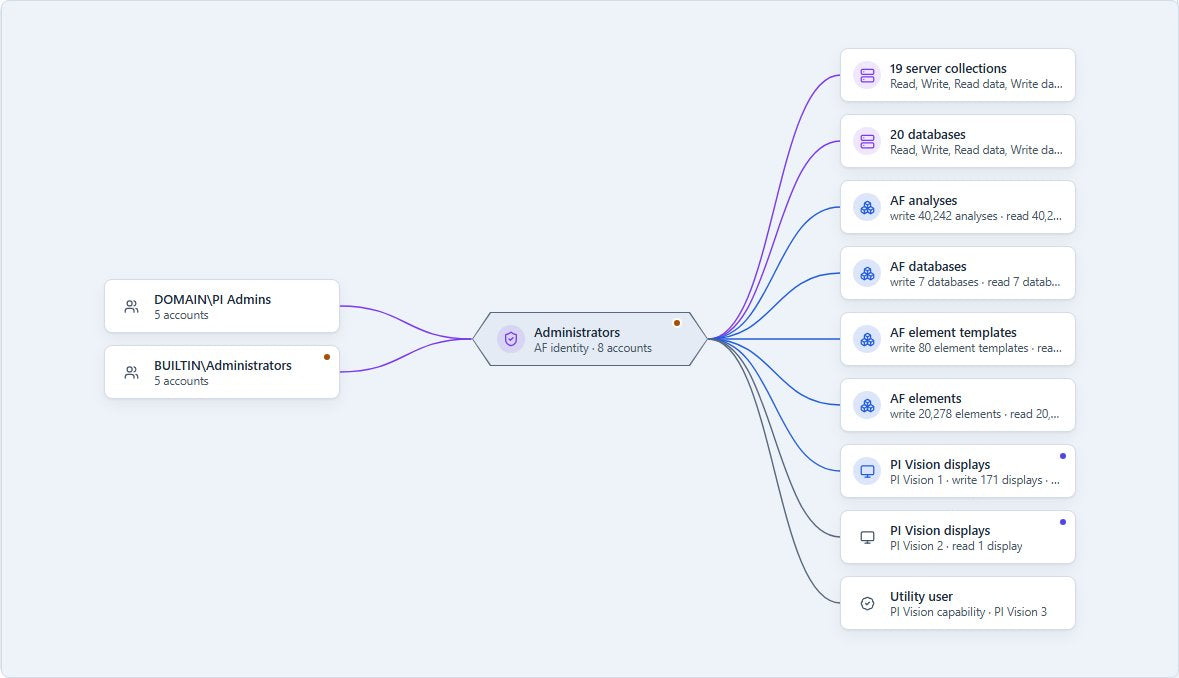
- Maps per server, account, identity and object, with lines coloured by right: Admin, Write, Read and Deny.
- Nested AD groups are resolved, so you see the accounts a mapping really reaches, not just a group name.
- For each identity: who is mapped to it, how many accounts that reaches, and the strongest right it grants.
Start from a person, or start from a tag
The questions from the introduction run in opposite directions. The Access page answers both.
From an account
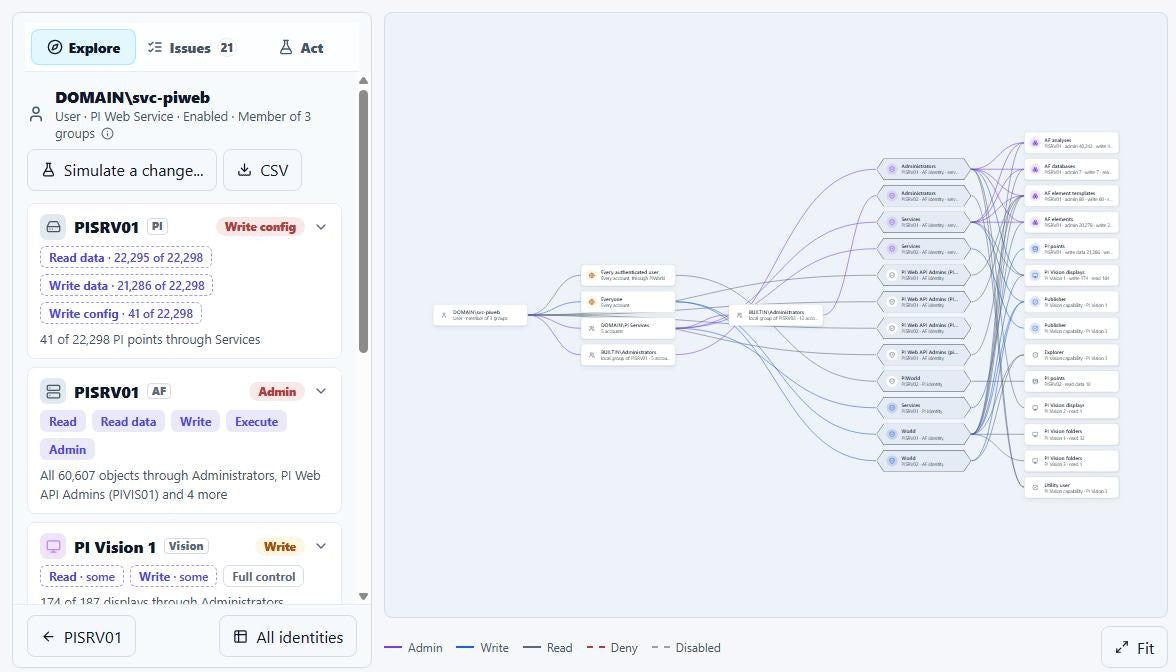
Search for any account, group or identity. For an account, the sidebar shows what it can reach on every server; open a server's card for the counts per object type. Select a grant to read why: the identities that grant it, the paths through groups and mappings, and the allow and deny entries behind them.
From a PI Point, AF object or display
Open a PI Point, AF database, element template, element, analysis or PI Vision display and use its Access tab. For PI Vision displays it shows the effective access after folder inheritance.
Either way, every grant comes with the path that explains it: which group the account is in, which mapping that group hits and which identity carries the right. That path is what a spreadsheet does not keep.
Let PI Nexus+ flag risky grants and drift
A review is a snapshot. Access issues keep checking after it is done.
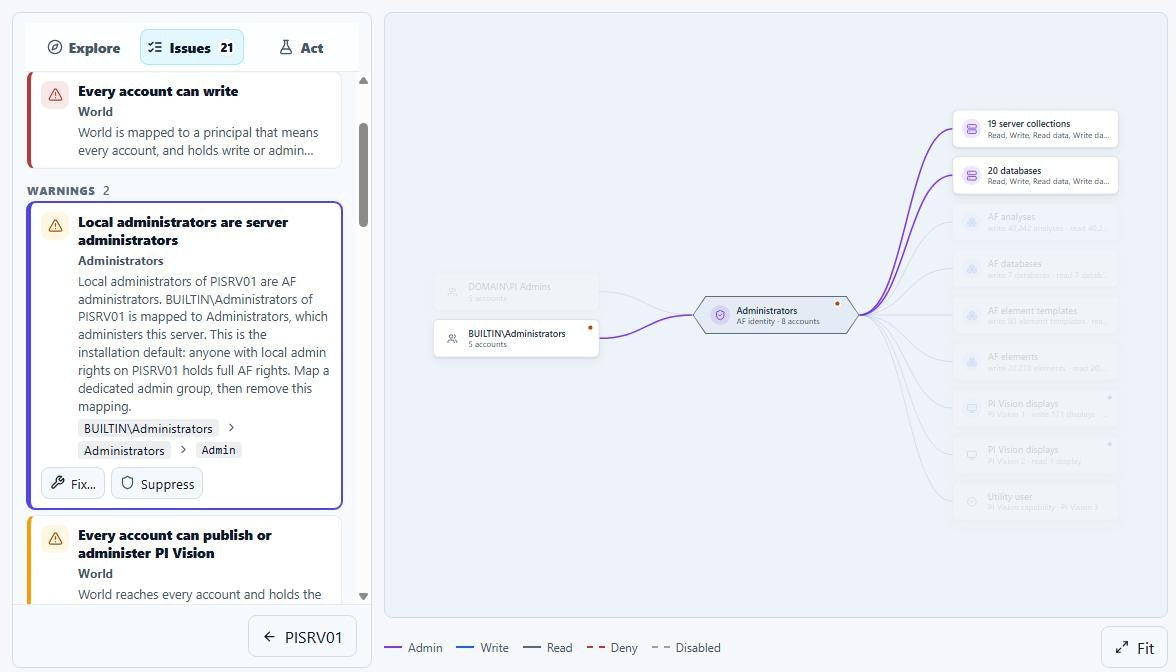
- After each read, PI Nexus+ raises Access issues for patterns such as the ones listed above.
- A new broad grant raises an Error, so drift since the last review shows up as an issue, not in next year's audit.
- Change History records security changes: identities, mappings, group membership and object security.
- An optional Access issues email sends them to the people who own PI security.
Select an issue and the map focuses on its identity with the issue's path highlighted and its evidence below.
Simulate a security change before anyone makes it
Removing a broad mapping is easy. Knowing who loses rights they still need is not, and that is why broad grants survive for years.
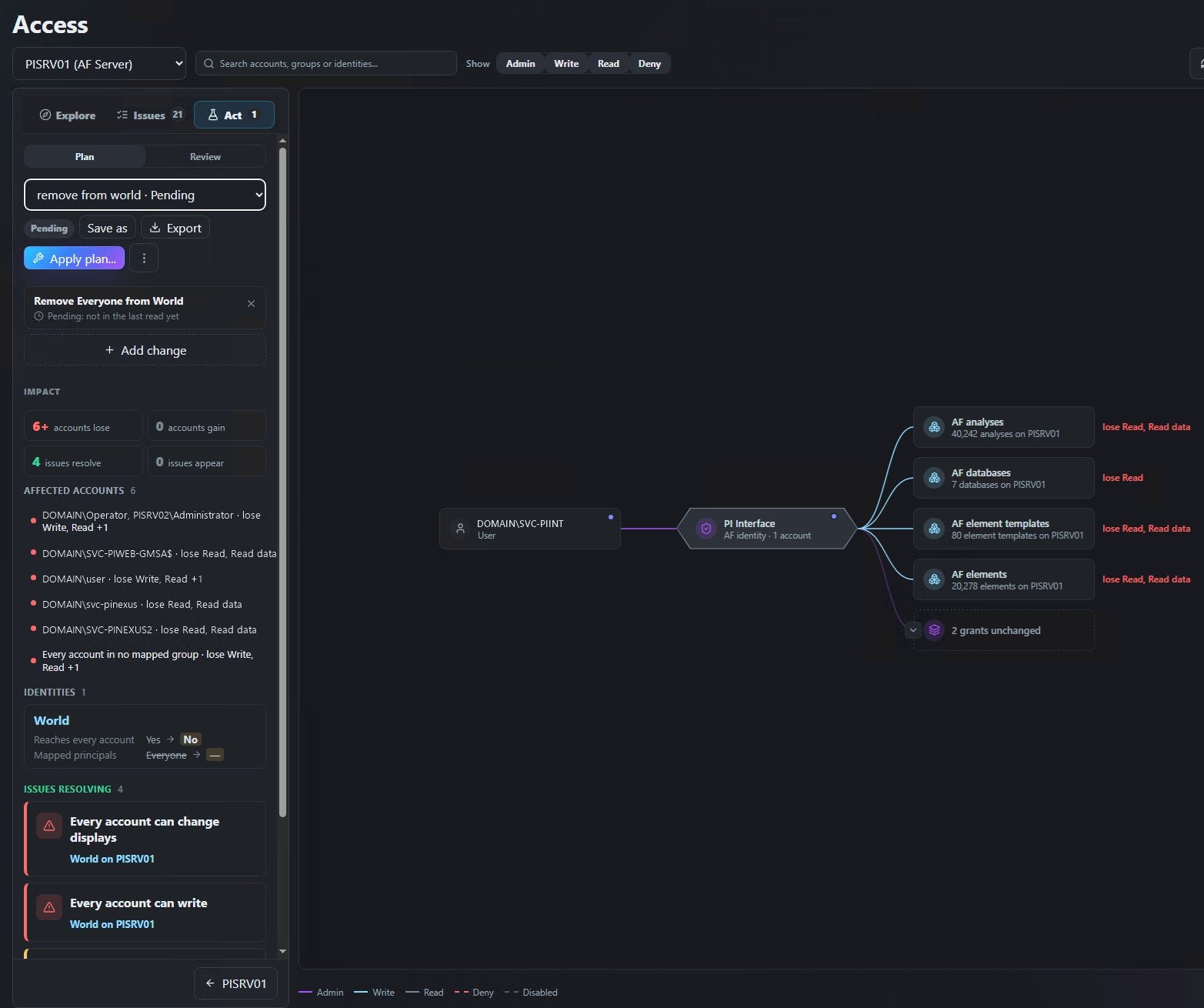
In the Act tab, you stage mapping, identity, group membership and security changes on one server. Before anything changes, PI Nexus+ shows:
- how many accounts lose and gain rights, and which rights;
- which Access issues resolve and which appear;
- on the map, which grants are removed or added and which stay unchanged.
In the example below, the plan removes Everyone from the World identity on an AF Server. Four issues resolve, no new ones appear, and the affected accounts list shows exactly who loses Read or Write, including several service accounts.
Apply the change: script or fix with undo
A saved scenario can go two ways, depending on how your team changes PI security.
- Export it. The scenario becomes a PowerShell script with a guard before every step and an undo script, plus the matching steps for PI System Explorer, PI SMT and Active Directory Users and Computers for teams that make changes by hand. Some steps, such as AF element security, stay manual.
- Let PI Nexus+ apply it. Access issues with an unambiguous change can be fixed from the issue, and a staged plan is applied in a safe order. PI Nexus+ writes only while the object still holds what it read, and every fix can be undone while the object still holds what the fix wrote.
Writes are off by default. An administrator allows each kind of write per server on the Writes tab, with a production licence, and every write is recorded in Change History. After the change, Read now shows each step of a saved scenario as Applied, Pending or Conflicting.
Close the access review with evidence
When you have checked an identity, mark it reviewed. If it changes afterwards, PI Nexus+ shows that, so the next review starts from what changed rather than from zero. Identities that can write or administer and were last reviewed more than a year ago raise an issue; identities that were never reviewed are not reported.
The Review CSV is the evidence file for your periodic access review. The Access user guide describes every view, and the Access issue catalogue lists all 22 checks.
Questions about PI System access mapping
Does PI Nexus+ change our PI security settings?
The Access page only reads. Changes happen only through fixes that an administrator has allowed for that server, or through an exported script that your team runs.
Who can see the Access page?
PI Nexus+ administrators only. Viewers and Operators see no Access page, Access issues or security changes.
How current is the access map?
PI Nexus+ reads security every four hours and whenever an administrator selects Read now.
Which servers and objects are covered?
Every PI Data Archive, AF Server and PI Vision instance that PI Nexus+ monitors: PI and AF identities, mappings, accounts and AD groups, and the security of PI Points, AF databases, element templates, elements, analyses and PI Vision displays.


