



PI Nexus+ / Installation and Administration
3. Prepare the Server
Install PI Nexus+ on a Windows Server that has network access to the systems it will inventory. The server does not need to be a PI Server, AF Server, or SQL Server, but it must be able to reach those systems.
Overview
Install PI Nexus+ on a Windows Server that has network access to the systems it will inventory. The server does not need to be a PI Server, AF Server, or SQL Server, but it must be able to reach those systems.
Before running the installer, confirm:
- You are logged on as a local administrator.
- AVEVA AF SDK / PI AF Client is installed.
- The server can resolve and reach the SQL Server name.
- The server can resolve and reach PI Data Archive server names.
- The server can resolve and reach AF server names.
- If PI Vision inventory will be used, the server can reach the PI Vision SQL Server and PI Vision web URL.
- If PI Interface Intelligence will be enabled for any PI Data Archive, install the 64-bit legacy PI SDK on the PI Nexus+ server as described below.
PI Nexus+ uses the AF SDK for PI Data Archive and Asset Framework discovery and scanning. If the AF SDK / PI AF Client is missing, PI server discovery and AF scans will fail even if the PI Nexus+ installation itself completes successfully.
The legacy PI SDK is optional and is used only to read the PI Module Database for PI Interface Intelligence. PI Nexus+ does not install it and the installer does not block when it is absent. Interface Tracking defaults off on every PI Data Archive, so normal scans do not attempt PI SDK or report Module Database failures unless an administrator explicitly opts that target in.
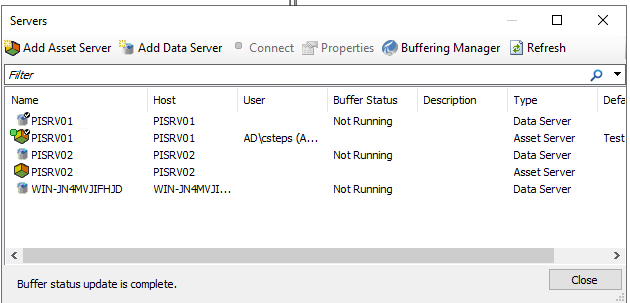
Also make sure all PI Data Archives and AF Servers that need to be scanned are available in the Connections overview in PI System Explorer. PI Nexus+ uses those configured PI System connections during discovery and scanning.
The PI Nexus+ installer configures IIS and required application prerequisites automatically. After installation, IIS should contain the PI Nexus+ site and the PINexusAppPool application pool.
3.1 Install the Optional Legacy PI SDK
The legacy PI SDK is required only when Interface Tracking will be enabled. PI Nexus+ uses it to read the %OSI\Interfaces hierarchy from the PI Module Database. Skip this subsection when PI Interface Intelligence is not required.
To install it:
- Sign in to the AVEVA PI System Customer Portal with an account authorized to download products for the organization.
- Open the product download area and search for PI SDK.
- Download the latest PI SDK version supported by the site's PI System agreement and confirm that the setup kit includes the 64-bit component.
- Copy the setup kit to the PI Nexus+ server and run it as a local administrator.
- Install the 64-bit PI SDK component and complete the setup wizard.
- Recycle the
PINexusAppPoolIIS application pool and restart thePI Nexus+ ScannerWindows service. - In PI Nexus+, enable Interface Tracking for the PI Data Archive and run Test Module DB.
If PI SDK is not listed in the portal, ask the organization's AVEVA portal administrator or AVEVA account representative to confirm download permissions and product entitlement. Do not copy PI SDK DLLs from another computer or run manual COM-registration commands. Install the supported 64-bit PI SDK package and validate access with Test Module DB.
3.2 Size SQL Server Memory
A dedicated SQL Server is preferred for larger PI Nexus+ inventories. When SQL Server shares a machine with PI Data Archive, AF, PI Vision, PI Nexus+, or other services, configure max server memory (MB) so Windows and those services retain measured headroom. SQL Server's default maximum is intentionally broad and is not a safe capacity plan for a co-hosted PI server.
For a 16 GB co-hosted lab or small deployment, 6-8 GB is a reasonable initial SQL Server cap, but it is not a universal production value. Measure the other services at normal load, leave additional operating-system headroom, and adjust the cap from evidence. A dedicated SQL Server can normally receive a larger share of host memory. PI Nexus+ reports read-only SQL and scan-workspace memory diagnostics under Admin > Support > Scale; it never changes the SQL instance configuration automatically.
Server-wide memory metrics require VIEW SERVER PERFORMANCE STATE on SQL Server 2022 and later (or the corresponding older-version server-state permission). This permission is optional. Without it, the Scale page and support bundle continue to work and explain that the server-wide metrics are unavailable.
Do not use DBCC FREEPROCCACHE, DBCC DROPCLEANBUFFERS, database shrinking, or recurring service restarts as routine memory management. Those actions discard useful cache or create additional work and can temporarily make the PI System slower. Configure an appropriate SQL memory cap. If memory pressure persists, capture the Scale diagnostics and a support bundle before taking a controlled recovery action under DBA supervision.
Microsoft references: Server memory configuration, Troubleshoot SQL Server memory issues.



