



PI Nexus+ / Installation and Administration
7. Run Database Setup
When the installer finishes, it opens the PI Nexus+ database setup window if Run PI Nexus+ Database Setup now was left checked.
Overview
When the installer finishes, it opens the PI Nexus+ database setup window if Run PI Nexus+ Database Setup now was left checked.
This step prepares SQL Server for PI Nexus+. It creates or updates the PI Nexus+ database, grants the PI Nexus+ service account access to that database, applies the PI Nexus+ database schema, and saves the SQL connection used by PI Nexus+.
Run this step with the SQL setup account from Section 5. If User Account Control or Windows prompts for credentials, use an account that has the SQL Server permissions listed in Section 5.
If the database setup window does not open, run:
C:\Program Files\Software Athlete\PI Nexus+\Admin\Setup-Database.batEnter:
| Field | Recommended value | Explanation |
|---|---|---|
| SQL Server | SQL Server name | The SQL Server instance that will host the PI Nexus+ database |
| Database | PINexus | The PI Nexus+ application database |
| PI Nexus+ service account | DOMAIN\svc-pinexus | The account assigned to PINexusAppPool and the PI Nexus+ Scanner service |
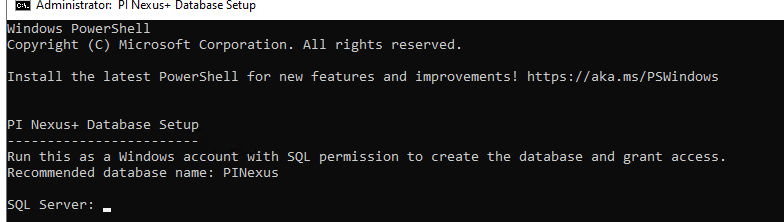
Wait until the database setup window reports success. After this succeeds, PI Nexus+ has the database, schema, permissions, and bootstrap configuration it needs. The scanner service should not report pending migrations after this step completes successfully.
A good result for this section is that bootstrap.json exists in ProgramData, the SQL database exists, the schema migration history is current, and the PI Nexus+ service account has access to that database.



