



Vision Audit+ / Administration Guide
Where settings are made
This chapter shows which settings you change in the Configuration Utility and which in the PI Vision toolbar.
Overview
This chapter shows which settings you change in the Configuration Utility and which in the PI Vision toolbar.
All settings are stored in the Configuration element of the Vision Audit+ AF database. The service reads them every minute. You change them in two places:
| Where | Who | What |
|---|---|---|
| Configuration Utility (on the Vision Audit+ server) | local administrator with AF Admin rights | connections, service account, SQL access, the feature switches, history, permissions, validation, display health, toolbar installation, system telemetry |
| Configuration view in the PI Vision toolbar | PI Vision administrator | the same history, permission, validation and display health settings, plus save reasons, the daily snapshot time and debug logging |
To open the Configuration view, open the Display History, Data Sources or Display Validation pane, select More options (the three dots at the top) and select Configuration. Change the settings and select Save. Only the changed values are written.
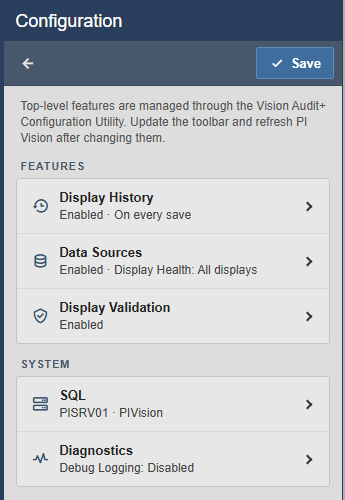
The toolbar never reads or writes passwords. It shows the SQL server, database and login read-only; they and the SQL password are set only in the Configuration Utility.
Every setting, its AF attribute and default is listed in Configuration Attributes.


