



Vision Audit+ / User Guide
Getting started
This chapter shows the Vision Audit+ panes and how to open them.
Overview
This chapter shows the Vision Audit+ panes and how to open them.
Vision Audit+ adds up to four panes to the PI Vision toolbar on the left. Your administrator decides which of them are available.
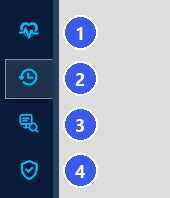
| No. | Pane | What you do there |
|---|---|---|
| (1) | Data Sources | check whether the data sources of the open display deliver good, current values, and export their values |
| (2) | Display History | see every version of the open display, revert to an earlier version, take snapshots and restore deleted displays from the recycle bin |
| (3) | Display Usage | find every display that uses a PI Point or AF attribute |
| (4) | Display Validation | submit a display for review, approve or reject it, and lock approved displays against changes |
To open a pane, open a display and select the pane's icon in the toolbar. The pane always shows the display that is open. Select the icon again to close the pane.
The panes Display History, Data Sources and Display Validation have a More options menu (three dots) at the top right. It opens this User Guide, About with the version, System Status, and for PI Vision administrators the Configuration view. The settings in Configuration are described in the Administration Guide.
What you may do
Vision Audit+ follows the permissions of PI Vision and of its AF database. Viewing works for every user who can read the Vision Audit+ AF database. Actions such as revert, snapshot or validation need edit access to the display, and some need ownership or PI Vision administrator rights, depending on the settings your administrator chose. A button you may not use is disabled; hover over it to see why, for example Requires display edit access or Requires owner access.
When a pane shows a message instead of content
| Message | Meaning |
|---|---|
This feature is disabled on the Vision Audit+ server... | the administrator has turned the feature off. Refresh PI Vision; if the message stays, ask your administrator |
Vision Audit+ could not load ... | the pane cannot reach the Vision Audit+ data in AF. The message names the cause and what to do. Select Reconnect to try again |
Save Display to View History | the display is new and has not been saved yet |


