



Vision Audit+ / Installation Guide
Prerequisites and system preparation
This chapter lists the requirements and prepares PI Web API, the service account, the AF database and the PI Vision SQL database before you install Vision Audit+.
Overview
This chapter lists the requirements and prepares PI Web API, the service account, the AF database and the PI Vision SQL database before you install Vision Audit+.
System requirements
- 64-bit Windows Server.
- No separate runtime: Vision Audit+ ships as a self-contained .NET 10 application. You do not need to install the .NET Desktop Runtime.
- Vision Audit+ can run on the PI Vision server or on any other server that reaches PI Web API, the AF server and the PI Vision SQL Server.
Software requirements
- AVEVA PI Vision 2021 or later. PI Vision 2026 requires Vision Audit+ 2.0.1 or later.
- AVEVA PI Web API 2017 or later
- A license file
license.datfrom Software Athlete for your PI Vision SQL Server and database
Important: If you use PI Web API 2023 SP1, install PI Web API 2023 SP1 Patch 1. Without the patch, a defect in the PI Web API user cache can stop the Vision Audit+ toolbar and service from working.
Configure PI Web API
Vision Audit+ reads and writes AF through PI Web API, both from the service and from the user's browser.
Install PI Web API and run the PI Web API Configuration Utility. If PI Web API is installed on the PI Vision server, use the PI Vision user account for it. Otherwise, create a separate account, set the HTTP SPN (Service Principal Name) for that account and enable Kerberos delegation to the PI and AF servers. See How to configure Kerberos for PI Web API.
Then set the PI Web API configuration attributes:
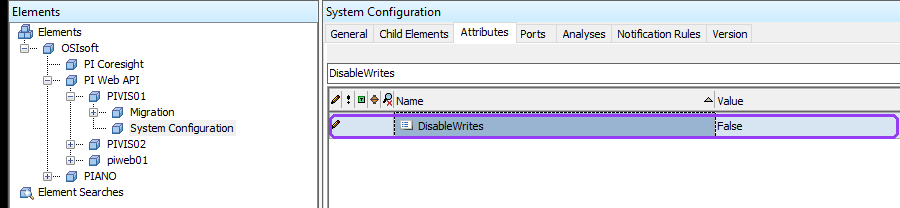
- Open PI System Explorer and connect to the AF database
Configuration. - Select OSIsoft > PI Web API > <your PI Web API instance> > System Configuration.
- Set
DisableWritestoFalse. - Set
EnableCSRFDefensetoFalse. - Create the attribute
RateLimitMaxRequestswith value typeInt32and the value10000, if it does not exist yet. - Check in the changes and restart the PI Web API service.

The Data Sources pane and the display health check read many values at once. The higher request limit prevents PI Web API from rejecting these reads with HTTP 429 (Too Many Requests).
Configure CORS for a separate PI Web API server
Skip this section if PI Web API runs on the PI Vision server.
If PI Web API runs on another server, the browser sends the toolbar's requests to a different address than PI Vision. PI Web API must allow this with CORS (Cross-Origin Resource Sharing). Set these attributes in the same System Configuration element:
| Attribute | Value |
|---|---|
CorsExposedHeaders | Allow,Content-Encoding,Content-Length,Date,Location |
CorsHeaders | * |
CorsMethods | GET,OPTIONS,POST,PUT,PATCH,DELETE |
CorsOrigins | comma-separated list of every address users open PI Vision with, without spaces, for example https://pivision1.company.com,https://pivision2.company.com |
CorsSupportsCredentials | True |
DisableWrites | False |
EnableCSRFDefense | False |
XFrameOptions | empty |
If PI Vision runs behind a network load balancer, add the load balancer alias and every server name to CorsOrigins, for example https://NLB-Alias,https://PrimaryHostname,https://SecondaryHostname.

PI Vision 2026 and later: PI Vision 2026 sends its own content security policy, which lets the browser contact only PI Vision's own address. A PI Web API on another server, or on another port of the same server, is blocked even when CORS is set.
Allow the PI Web API address in PI Vision's web.config: in <appSettings>, add <add key="DefaultSrcPolicy" value="https://piwebapi.company.com" /> with the PI Web API address (several addresses separated by spaces; wildcards such as https://*.company.com are allowed). PI Vision restarts when web.config is saved. For details see AVEVA's PI Vision documentation, "Change content security policy". The CORS settings above are still needed. If PI Web API runs on the PI Vision server, leave its URL empty in the Configuration Utility: the toolbar then uses PI Vision's own address and needs no change.
Create the service account
The Vision Audit+ service runs as a Windows account that needs access to PI Web API, the AF database and the PI Vision SQL database.
Use one of these accounts:
- The PI Vision service account (recommended). It already reaches PI Web API and the PI Vision database.
- A dedicated domain account. Create the account and give it the Log on as a service right on the Vision Audit+ server.
- A group managed service account (gMSA). Authorize the Vision Audit+ server to use the gMSA. Windows manages its password.
You enter the account in the Configuration Utility. For Windows authentication to SQL Server, the account must be a domain account or a gMSA; built-in accounts such as LocalSystem or NT SERVICE\... cannot be checked against SQL Server.
The Configuration Utility does not grant Windows rights. Grant Log on as a service in the local security policy (or a group policy) before you start the service.
Create the AF database
Vision Audit+ stores its configuration, the display history and all user requests in an AF database. Create a new database for Vision Audit+ instead of using the Configuration database. A separate database lets you manage the permissions for history, revert and validation independently, and users need no access to Configuration.
- Open PI System Explorer and select File > Database.
- Select New Database, enter a name (for example
VisionAudit) and select OK. - Right-click the new database, select Security and set the permissions in the table below.
| Identity | Permissions | Why |
|---|---|---|
| Vision Audit+ service account | Admin, Read, Write, Read Data, Write Data, Delete | creates the AF structure and templates, writes the history and processes requests |
| PI Web API service account | Read, Read Data | lets PI Web API read the database |
| Users who only view history and data sources | Read, Read Data | the toolbar reads the history directly from AF |
| Users who create snapshots, revert, restore, validate, run health scans or search in Display Usage | Read, Read Data, Write, Write Data | each action is a request the toolbar writes to AF |
| Users who add comments to history entries | add Annotate | comments are AF annotations |
If the service account has no AF identity yet, create an AF identity and map the account to it first.
If you use the Data Sources feature, the service account also needs Read and Read Data on the PI Points and AF elements that the displays show. The display health check reads their current values as the service account; a data source the account cannot read is reported as an Error (Access to the data source was denied).
The Configuration Utility does not create the AF database. On the first run it creates the Vision Audit+ structure inside the database you select. For the permission rules that keep the validation workflow bypass-resistant, see Permissions and Security in the Administration Guide.
Prepare the PI Vision SQL database
The Vision Audit+ service reads the displays from the PI Vision SQL database and writes them back on revert and restore. The Configuration Utility checks the permissions of the service account and can grant them, or give you a script for your database administrator.
The service needs these rights in the PI Vision database, and nothing more:
| Object | Rights |
|---|---|
View_Displays | SELECT |
BrowseElements | SELECT, INSERT, UPDATE, ALTER |
BaseDisplays, StandardDisplays (PI Vision 2025 and earlier) | SELECT, INSERT, UPDATE |
DisplayRevisions, DisplayRevisionAttachments (PI Vision 2026 and later) | SELECT, INSERT |
UpdateDisplayDatasources procedure (PI Vision 2026 and later) | EXECUTE |
BrowseElementIdentities, DisplayThumbnails | SELECT, INSERT |
Identities | SELECT |
The Configuration Utility detects the PI Vision version from the database and checks or grants only the rights that version needs. After you upgrade PI Vision to 2026, run the access check again in the Configuration Utility.
You need either a Windows account or SQL login with administrator rights on the PI Vision SQL Server once, during the Configuration Utility run, or a database administrator who runs the generated script. The service account itself needs no db_owner, db_datareader or db_datawriter role.
Note: ALTER on BrowseElements also permits schema changes on that table. Vision Audit+ needs it to restore deleted displays with their original IDs.
SQL Server replication and change data capture
Ask your database administrator whether transactional replication or Change Data Capture (CDC) applies to the SQL database of the AF server, or to the PI Vision SQL database. Clustering or availability groups alone do not make this section apply.
SQL Server limits large values in replicated or captured columns to 65,536 bytes by default (max text repl size). The display configuration that Vision Audit+ stores in AF can exceed this limit. Then history writes for large displays fail while smaller displays succeed.
The administrator sets Max Text Replication Size in SQL Server Management Studio under the SQL Server instance Properties > Advanced > Miscellaneous. Size it for the largest expected display, for example 1,048,576 bytes (1 MiB), and set it on every applicable instance, including failover targets. Vision Audit+ never changes this setting. See Configure the max text repl size.


