



PI Nexus+ / Administration Guide
Sites
This chapter groups servers into sites, usually by plant, so that users can filter the app by site and emails can go to each site's team. Sites are available in every edition. What users see is described in Servers and Sites in the User Guide.
Overview
This chapter groups servers into sites, usually by plant, so that users can filter the app by site and emails can go to each site's team. Sites are available in every edition. What users see is described in Servers and Sites in the User Guide.
How sites work
- Every PI Data Archive, AF server, PI Vision instance and monitored host belongs to one site. AF databases, PI Points, AF objects and displays follow their server.
- A Default site always exists and receives every new server unless you choose another. You can rename it, for example to
Central, but not delete it. - Site columns, fields, filters and dashboard tiles stay hidden until a second site exists.
Create sites
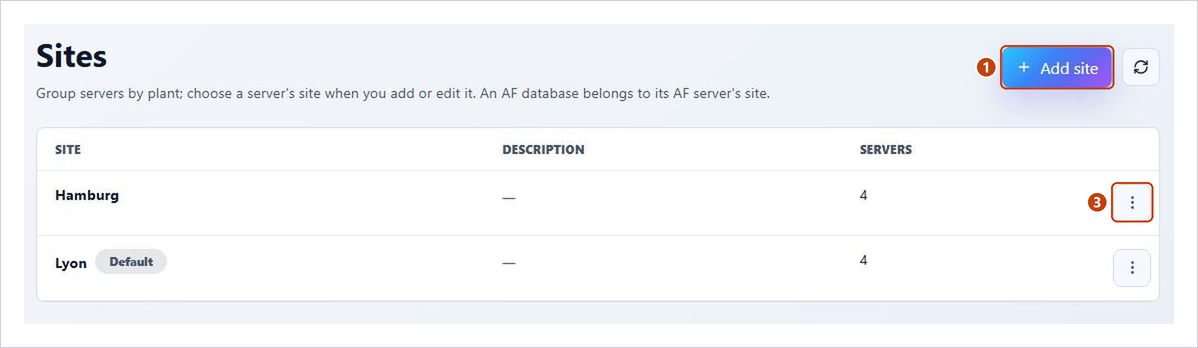
- Open Admin > Sites and choose Add site.
- Enter a Name, unique regardless of case, and an optional Description, and choose Save.
- To rename a site later, choose Edit in its row menu.
The Servers column counts the PI Data Archives, AF servers and PI Vision instances in each site.
Assign servers to a site
A server's site is chosen where the server is configured, not on the Sites page:
- PI Data Archives and AF Servers: Site in the Add dialog, or Edit in the server's row menu. Changing only the site keeps the connection test result. Moving an AF server moves all its databases.
- PI Vision Instances: Site in the Add Instance or Edit dialog.
- Hosts: Site in the host's dialogs (see Host Monitoring).
The change shows at once; no scan is needed.
Delete a site
- In the site's row menu, choose Delete. The dialog says how many servers move to the Default site.
- Choose Delete site. Its servers and hosts move to the Default site in one step.
Email recipients limited to the deleted site lose it; what happens to them is described under Emails per site in Notifications.
Reference: Sites and Change Tracking Settings


