



PI Nexus+ / Installation Guide
Overview and Architecture
This chapter tells you what PI Nexus+ installs, where its parts run, and the order in which you install it.
Overview
This chapter tells you what PI Nexus+ installs, where its parts run, and the order in which you install it.
PI Nexus+ is a separate application next to your PI System. It reads PI Data Archives, AF Servers, PI Interfaces, PI Adapters and PI Vision, and stores inventory, health, dependencies and change history in its own SQL Server database. It installs nothing on the PI servers.
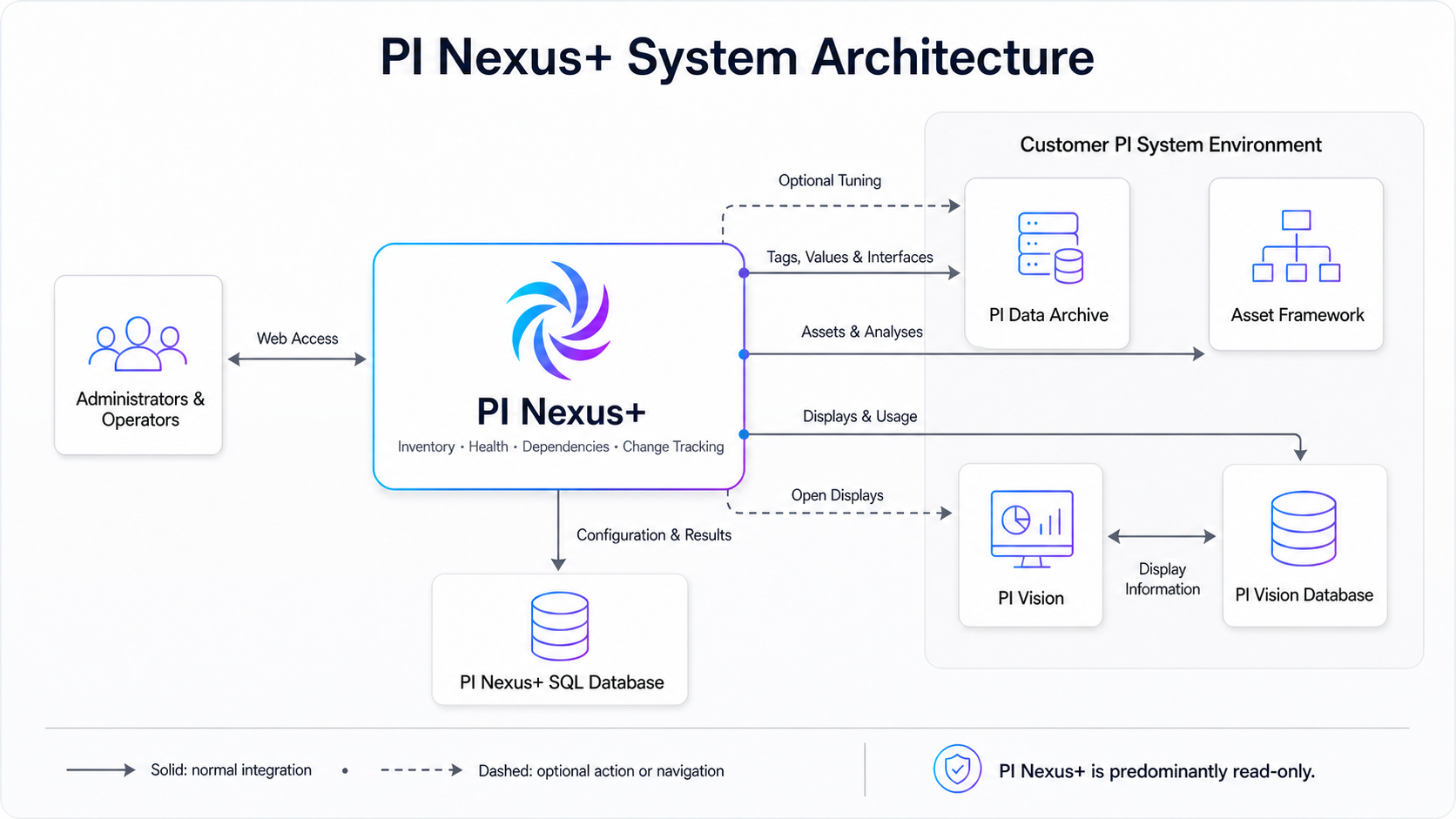
What gets installed
| Part | Default | Purpose |
|---|---|---|
| Web application | IIS site PI Nexus+, app pool PINexusAppPool, HTTP port 5139 | The browser interface, the Admin pages and their tests |
| Scanner service | Windows service PI Nexus+ Scanner | Scans, health refreshes, runtime polls, host monitoring and emails |
| Database | PINexus on your SQL Server | All configuration and results |
| Program folder | C:\Program Files\Software Athlete\PI Nexus+ | Program files and the setup and recovery scripts |
| Data folder | C:\ProgramData\Software Athlete\PI Nexus+ | bootstrap.json (the database connection) and the logs |
The web application and the scanner service run on one server by default. They can also run on two servers that share the database; see Split Deployment. The two never talk to each other directly: SQL Server is their only connection.
PI Nexus+ reads from the PI System. It writes to it only when an administrator uses an explicit write feature, such as applying compression settings or recalculating analyses, and only after you grant the rights for it (see the Administration Guide).
Installation order
- Plan the deployment and open the network paths.
- Prepare the service account.
- Prepare SQL Server.
- Run the installer.
- Set up the database.
- Verify the runtime identities.
- Open PI Nexus+ and install the license.
- Add the first targets, run scoped test scans, then start automatic monitoring.
Reference: Prerequisites


