



Vision Library+ / Gauges and process visualization
Duval Triangle+
Duval Triangle+ plots dissolved-gas measurements to help qualified users classify transformer fault regions.
Overview
Duval Triangle+ plots dissolved-gas measurements to help qualified users classify transformer fault regions.
When to use it
Use this symbol when you need to:
- Visualize an established Duval diagnostic calculation.
- Compare current dissolved-gas results with defined fault regions.
Before you begin
- Prepare the three required gas measurements for the selected triangle type.
- Use this symbol only within an approved transformer diagnostic workflow.
Add and set up the symbol
- Select the symbol in the PI Vision symbol gallery.
- Add the required data sources or asset context to the display.
- Right-click the symbol and open its configuration pane.
- Configure the minimum data, range, and display settings for a useful result.
- Confirm that the symbol shows the expected data.
How to use the symbol
Adding Data to the Symbol
Duval Triangle+ requires exactly three data sources (PI Tags or AF Attributes) to function.
- Drag and drop three gas measurements onto the symbol from your PI Vision search pane.
- Order Matters - the symbol uses Index A, Index B, and Index C to assign gases to the correct axes. The required gas for each index depends on the Triangle Type selected.
Configuring the Symbol
Right-click the symbol and select Format Symbol to open the configuration pane.
- Triangle Type - choose Triangle 1, 2, 4, or 5 based on your equipment type and the fault being investigated. Axis labels and zone boundaries update automatically.
- Point & History Styling:
- Current State - customize the color, size, and border of the main data point. Enable the Pulse effect (ripple animation) to make the current transformer state easy to locate on busy displays.
- Show History - displays a trail of past data points based on the current display time range. Older points shrink and become more transparent to show the fault trajectory over time.
- Zones & Colors:
- Customize the fill color of each fault zone to match your organization's standards.
- Toggle Show Labels on or off to hide or show the standard zone abbreviations (PD, T1, D2, and so on).
- Adjust the thickness and color of zone borders.
- Axes & Grid Lines:
- Toggle major axis lines, inner grid lines, and tick marks on or off.
- Tick marks can be oriented inside or outside the triangle.
- Custom Labels - the symbol automatically provides standard chemical labels (for example, % CH₄), but you can override Label A, Label B, and Label C with custom text.
Use the symbol
Review the plotted marker and its region label. Interpret the result together with the source measurements and your organization's diagnostic procedure.
Configure the symbol
Overview and behavior
Duval Triangle+ provides advanced visual diagnostics for condition monitoring of oil-filled electrical equipment, including power transformers and Load Tap Changers (LTCs).
By bringing ternary (three-axis) plotting natively into PI Vision, this symbol lets reliability engineers track transformer health, detect early-stage faults, and visualize historical degradation alongside operational PI data.
What is the duval triangle used for?
The Duval Triangle is a globally recognized diagnostic method (referenced in IEEE and IEC standards) used in Dissolved Gas Analysis (DGA).
When faults occur inside an oil-filled transformer - such as overheating or electrical arcing - the insulating oil and cellulose paper break down, releasing specific combustible gases. The Duval Triangle takes the measured concentrations of three gases, calculates their relative percentages (summing to 100%), and plots a single coordinate on a triangular chart.
The triangle is divided into specific Fault Zones. The zone in which the coordinate lands identifies the type of internal fault:
- PD - Partial Discharge (Corona).
- T1, T2, T3 - Thermal faults (overheating) of increasing severity.
- D1, D2 - Electrical faults (sparking and arcing).
- DT / Mix - combined electrical and thermal faults.
The four duval triangle types
This symbol supports four versions of the Duval Triangle, each designed for different equipment types and diagnostic scenarios.
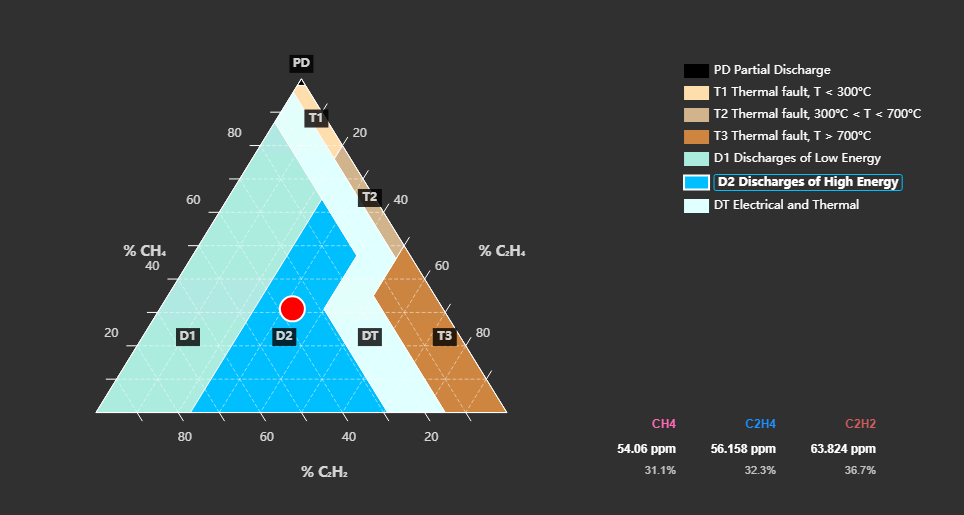
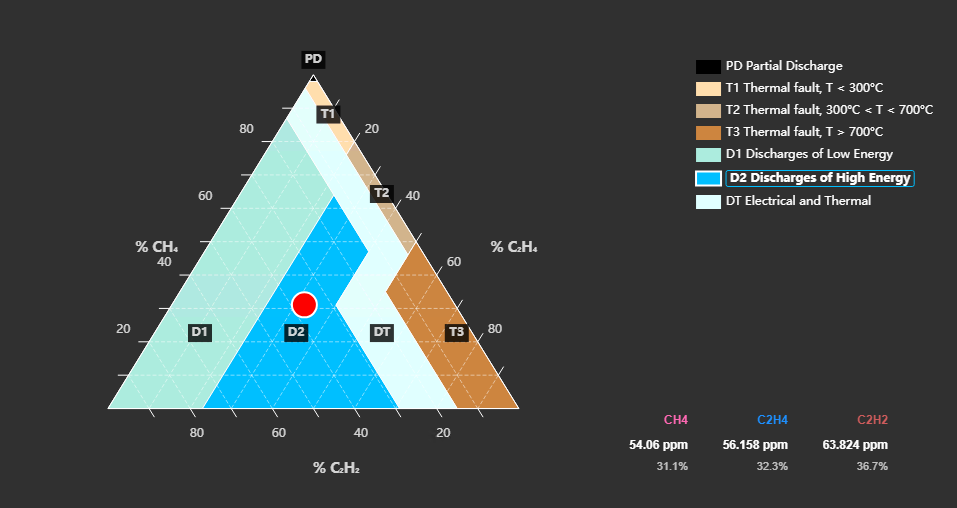
Triangle 1: Standard (Mineral Oil Transformers)
- Use Case - the most widely used triangle, designed for general fault diagnosis in standard power transformers filled with mineral oil.
- Data Inputs Required:
- Data A - Methane (CH₄)
- Data B - Ethylene (C₂H₄)
- Data C - Acetylene (C₂H₂)
- Fault Zones - Partial Discharge (PD), Thermal Faults (T1, T2, T3), Discharges/Arcing (D1, D2), and Mixed Faults (DT).
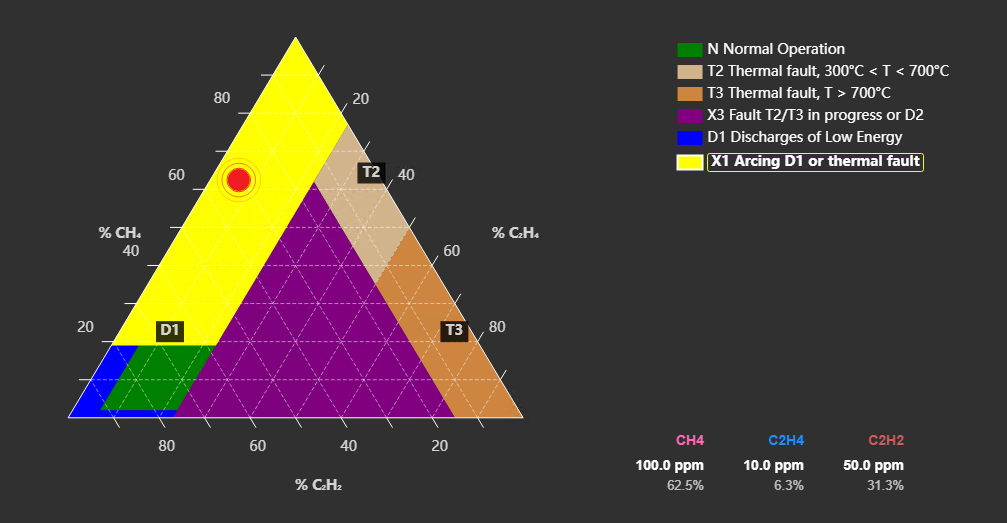
Triangle 2: Load Tap Changers (LTCs)
- Use Case - designed for Load Tap Changers operating in oil. LTCs produce arcing gases during normal switching, so this triangle shifts fault boundaries to distinguish normal switching arcs from severe abnormal faults.
- Data Inputs Required:
- Data A - Methane (CH₄)
- Data B - Ethylene (C₂H₄)
- Data C - Acetylene (C₂H₂)
- Fault Zones - Normal Operation (N), Abnormal Arcing (D1, X1), and Severe Thermal Faults (T2, T3, X3).
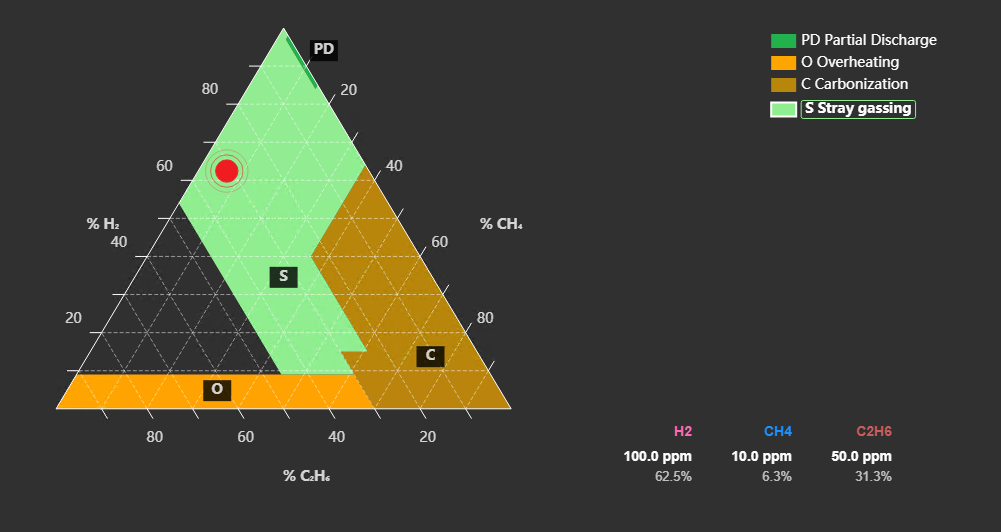
Triangle 4: Low-Temperature Faults (Stray Gassing)
- Use Case - used when low-energy faults or localized overheating is suspected, or to investigate stray gassing (gases produced by oil degradation at lower temperatures without a severe fault).
- Data Inputs Required:
- Data A - Hydrogen (H₂)
- Data B - Methane (CH₄)
- Data C - Ethane (C₂H₆)
- Fault Zones - Partial Discharge (PD), Overheating (O), Carbonization of Paper (C), and Stray Gassing (S).
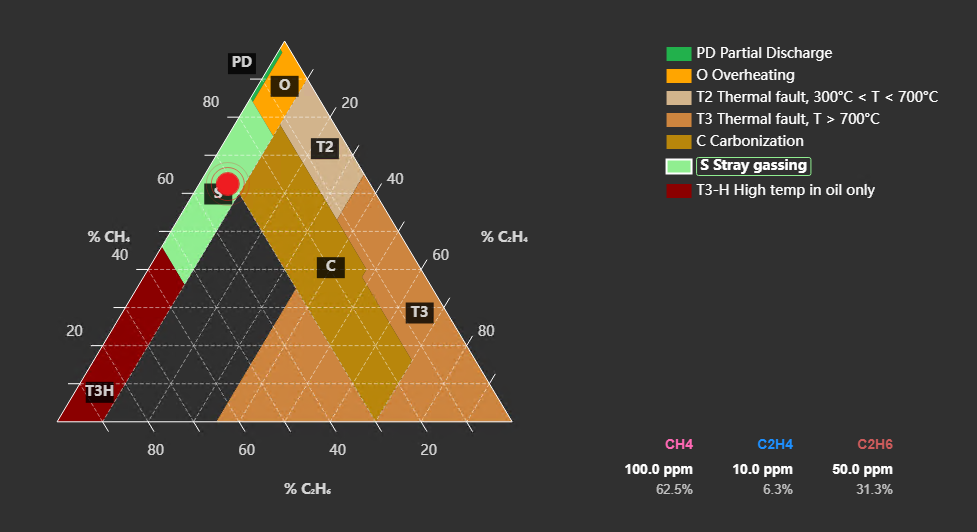
Triangle 5: High-Temperature Faults & Non-Mineral Oils
- Use Case - complements Triangle 1 for high-temperature thermal faults, or for specialized oil types. Focuses on gases generated at higher thermal stress levels.
- Data Inputs Required:
- Data A - Methane (CH₄)
- Data B - Ethylene (C₂H₄)
- Data C - Ethane (C₂H₆)
- Fault Zones - Partial Discharge (PD), Overheating (O, T3H), Thermal Faults (T2, T3), Carbonization (C), and Stray Gassing (S).
Troubleshooting and limitations
- Check: If no point appears, confirm that all required gas values are numeric and available.
- Check: The symbol supports diagnosis but does not replace engineering assessment or the applicable standard.



